# Flutter AI 工具包
> 了解如何将 AI 工具包聊天机器人添加到你的 Flutter 应用中。
Hello and welcome to the Flutter AI Toolkit!
你好,欢迎使用 Flutter AI 工具包!
The AI Toolkit is a set of AI chat-related widgets that make it easy to add an
AI chat window to your Flutter app. The AI Toolkit is organized around an
abstract LLM provider API to make it easy to swap out the LLM provider that
you'd like your chat provider to use. Out of the box, it comes with support for
[Firebase AI Logic][].
AI 工具包是一组 AI 聊天相关 widget,便于在 Flutter 应用中添加 AI 聊天窗口。
工具包围绕抽象的 LLM 提供商 API 组织,便于更换聊天所用的 LLM 提供商。
开箱即支持 [Firebase AI Logic][Firebase AI Logic]。
[Firebase AI Logic]: https://firebase.google.com/docs/ai-logic
## Key features
## 主要特性
* **Multiturn chat**: Maintains context across multiple interactions.
**多轮聊天**:在多次交互间保持上下文。
* **Streaming responses**: Displays AI responses in real-time as they are
generated.
**流式传输**:在生成过程中实时显示 AI 回复。
* **Rich text display**: Supports formatted text in chat messages.
**富文本显示**:支持聊天消息中的格式化文本。
* **Voice input**: Allows users to input prompts using speech.
**语音输入**:让用户通过语音输入提示词。
* **Multimedia attachments**: Enables sending and receiving various media types.
**多媒体附件**:支持发送与接收多种媒体类型。
* **Function calling**: Supports tool calls to the LLM provider.
**函数调用**:支持向 LLM 提供商发起工具调用。
* **Custom styling**: Offers extensive customization to match your app's design.
**自定义样式**:提供丰富自定义以匹配应用设计。
* **Chat serialization/deserialization**: Store and retrieve conversations
between app sessions.
**聊天序列化/反序列化**:在应用会话间存储与恢复对话。
* **Custom response widgets**: Introduce specialized UI components to present
LLM responses.
**自定义响应 widget**:引入专用 UI 组件展示 LLM 回复。
* **Pluggable LLM support**: Implement a simple interface to plug in your own
LLM.
**可插拔 LLM 支持**:实现简单接口以接入自有 LLM。
* **Cross-platform support**: Compatible with Android, iOS, web, and macOS
platforms.
**跨平台支持**:兼容 Android、iOS、web 与 macOS。
## Demo
## 演示
Here's what the demo example looks like hosting the AI Toolkit:
托管 AI 工具包的演示示例如下:
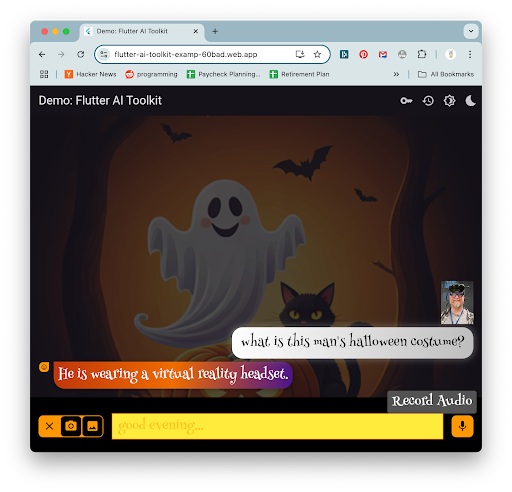 The [source code for this demo][src-code] is available in the repo on GitHub.
该 [演示源代码][src-code] 可在 GitHub 仓库中获取。
[src-code]: https://github.com/flutter/ai/blob/main/example/lib/demo/demo.dart
## Get started
## 入门
The [source code for this demo][src-code] is available in the repo on GitHub.
该 [演示源代码][src-code] 可在 GitHub 仓库中获取。
[src-code]: https://github.com/flutter/ai/blob/main/example/lib/demo/demo.dart
## Get started
## 入门
- Installation安装
Add the following dependencies to your `pubspec.yaml` file:
在 `pubspec.yaml` 中添加以下依赖:
```yaml
dependencies:
flutter_ai_toolkit: ^latest_version
firebase_ai: ^latest_version
firebase_core: ^latest_version
```
- Configuration配置
The AI Toolkit supports both the Gemini endpoint (for prototyping) and the
Vertex endpoint (for production). Both require a Firebase project and the
`firebase_core` package to be initialized, as described in the [Get started with
the Gemini API using the Firebase AI Logic SDKs][firebase_ai] docs.
AI 工具包同时支持 Gemini 端点(用于原型)与 Vertex 端点(用于生产)。
两者均需 Firebase 项目并初始化 `firebase_core` package,详见
[使用 Firebase AI Logic SDK 开始使用 Gemini API][firebase_ai] 文档。
[firebase_ai]:
https://firebase.google.com/docs/ai-logic/get-started?platform=flutter
Once that's complete, integrate the new Firebase project into your Flutter app
using the `flutterfire CLI` tool, as described in the [Add Firebase to your
Flutter app][firebase] docs.
完成后,使用 `flutterfire CLI` 将新 Firebase 项目集成到 Flutter 应用,详见
[将 Firebase 添加到你的 Flutter 应用][firebase] 文档。
[firebase]: https://firebase.google.com/docs/flutter/setup
After following these instructions, you're ready to use Firebase to integrate AI
in your Flutter app. Start by initializing Firebase:
按上述说明操作后,即可在 Flutter 应用中通过 Firebase 集成 AI。首先初始化 Firebase:
```dart
import 'package:firebase_core/firebase_core.dart';
import 'package:firebase_ai/firebase_ai.dart';
import 'package:flutter_ai_toolkit/flutter_ai_toolkit.dart';
// ... other imports
import 'firebase_options.dart'; // from `flutterfire config`
void main() async {
WidgetsFlutterBinding.ensureInitialized();
await Firebase.initializeApp(options: DefaultFirebaseOptions.currentPlatform);
runApp(const App());
}
// ...app stuff here
```
With Firebase properly initialized in your Flutter app, you're now ready to
create an instance of the Firebase provider. You can do this in two ways. For
prototyping, consider the Gemini AI endpoint:
在 Flutter 应用中正确初始化 Firebase 后,即可创建 Firebase provider 实例。有两种方式。
原型开发可考虑 Gemini AI 端点:
```dart
import 'package:firebase_ai/firebase_ai.dart';
import 'package:flutter_ai_toolkit/flutter_ai_toolkit.dart';
// ... app stuff here
class ChatPage extends StatelessWidget {
const ChatPage({super.key});
@override
Widget build(BuildContext context) => Scaffold(
appBar: AppBar(title: const Text(App.title)),
// create the chat view, passing in the Firebase provider
body: LlmChatView(
provider: FirebaseProvider(
// Use the Google AI endpoint
model: FirebaseAI.googleAI().generativeModel(
model: 'gemini-2.5-flash',
),
),
),
);
}
```
The `FirebaseProvider` class exposes the Firebase AI Logic SDK to the
`LlmChatView`. Note that you provide a model name ([you have several
options][options] from which to choose), but you do not provide an API key. All
of that is handled as part of the Firebase project.
`FirebaseProvider` 类向 `LlmChatView` 暴露 Firebase AI Logic SDK。
注意你需提供模型名称([有多种选项][options] 可选),但无需提供 API 密钥,均由 Firebase 项目处理。
For production workloads, it's easy to swap in the Firebase Logic AI endpoint:
生产工作负载可轻松切换为 Firebase Logic AI 端点:
```dart
class ChatPage extends StatelessWidget {
const ChatPage({super.key});
@override
Widget build(BuildContext context) => Scaffold(
appBar: AppBar(title: const Text(App.title)),
body: LlmChatView(
provider: FirebaseProvider(
// Use the Vertex AI endpoint
model: FirebaseAI.vertexAI().generativeModel(
model: 'gemini-2.5-flash',
),
),
),
);
}
```
For a complete example, check out the [gemini.dart] and [vertex.dart][]
examples.
完整示例请参阅 [gemini.dart] 与 [vertex.dart][vertex.dart] 示例。
[options]:
https://firebase.google.com/docs/vertex-ai/gemini-models#available-model-names
[gemini.dart]:
https://github.com/flutter/ai/blob/main/example/lib/gemini/gemini.dart
[vertex.dart]:
https://github.com/flutter/ai/blob/main/example/lib/vertex/vertex.dart
- Set up device permissions配置设备权限
To enable your users to take advantage of features like voice input and media
attachments, ensure that your app has the necessary permissions:
要启用语音输入与媒体附件等功能,请确保应用具备必要权限:
* **Network access:** To enable network access on macOS, add the following to
your `*.entitlements` files:
**网络访问:** 在 macOS 上,向 `*.entitlements` 文件添加:
```xml
...
com.apple.security.network.client
```
To enable network access on Android, ensure that your `AndroidManifest.xml`
file contains the following:
在 Android 上,确保 `AndroidManifest.xml` 包含:
```xml
...
```
* **Microphone access**: Configure according to the [record package's permission
setup instructions][record].
**麦克风访问**:按 [record package 权限设置说明][record] 配置。
* **File selection**: Follow the [file_selector plugin's instructions][file].
**文件选择**:遵循 [file_selector 插件说明][file]。
* **Image selection**: To take a picture on _or_ select a picture from their
device, refer to the [image_picker plugin's installation
instructions][image_picker].
**图片选择**:拍照或从设备选图请参阅 [image_picker 插件安装说明][image_picker]。
* **Web photo**: To take a picture on the web, configure the app according to
the [camera plugin's setup instructions][camera].
**Web 拍照**:在 Web 上拍照请按 [camera 插件设置说明][camera] 配置应用。
[camera]: https://pub-web.flutter-io.cn/packages/camera#setup
[file]: https://pub-web.flutter-io.cn/packages/file_selector#usage
[image_picker]: https://pub-web.flutter-io.cn/packages/image_picker#installation
[record]: https://pub-web.flutter-io.cn/packages/record#setup-permissions-and-others
## Examples
## 示例
**firebase_options.dart**
**firebase_options.dart**
To use the [Vertex AI example app][vertex-ex], place your Firebase configuration
details into the `example/lib/firebase_options.dart` file. You can do this with
the `flutterfire CLI` tool as described in the [Add Firebase to your Flutter
app][add-fb] docs **from within the `example` directory**.
要使用 [Vertex AI 示例应用][vertex-ex],将 Firebase 配置写入 `example/lib/firebase_options.dart`。
可在 **`example` 目录内** 使用 `flutterfire CLI`,按
[将 Firebase 添加到你的 Flutter 应用][add-fb] 文档操作。
:::note Security considerations for `firebase_options.dart`
`firebase_options.dart` 安全注意事项
If your Flutter app calls Gemini or Vertex AI directly from the client, do not
commit `firebase_options.dart` to a public repository. Anyone could reuse your
app configuration to send requests to your AI endpoint, consuming quota and
potentially causing billing costs.
若 Flutter 应用从客户端直接调用 Gemini 或 Vertex AI,请勿将 `firebase_options.dart` 提交到公开仓库。
他人可能复用你的应用配置向 AI 端点发送请求,消耗配额并可能产生费用。
While this guide shows direct client-side calls for simplicity, for production
apps, you should route AI requests through a backend service (for example [Cloud
Functions for Firebase](https://firebase.google.com/docs/functions), [Cloud
Run](https://cloud.google.com/run), or your own server). In that setup, the
backend — not the client — controls access, and including
`firebase_options.dart` in your repository is safe.
本指南为简便展示客户端直接调用;生产应用应通过后端服务路由 AI 请求
(例如 [Cloud Functions for Firebase](https://firebase.google.com/docs/functions)、
[Cloud Run](https://cloud.google.com/run) 或自有服务器)。
此时由后端而非客户端控制访问,将 `firebase_options.dart` 纳入仓库是安全的。
You should also review and follow the [Firebase security checklist](https://firebase.google.com/support/guides/security-checklist).
你还应查阅并遵循 [Firebase 安全清单](https://firebase.google.com/support/guides/security-checklist)。
:::
## Feedback
## 反馈
Along the way, as you use this package, please [log issues and feature
requests][file-issues] as well as submit any [code you'd like to
contribute][submit]. We want your feedback and your contributions to ensure that
the AI Toolkit is just as robust and useful as it can be for your real-world
apps.
使用本 package 时,请 [记录 issue 与功能请求][file-issues] 并 [提交你希望贡献的代码][submit]。
我们希望你的反馈与贡献使 AI 工具包尽可能稳健实用,服务于你的真实应用。
[add-fb]: https://firebase.google.com/docs/flutter/setup
[example apps]: https://github.com/flutter/ai/tree/main/example/lib
[file-issues]: https://github.com/flutter/ai/issues
[submit]: https://github.com/flutter/ai/pulls
[vertex-ex]: https://github.com/flutter/ai/blob/main/example/lib/vertex/vertex.dart