# 持久化存储架构:SQL
> 采用 SQL 将复杂的应用数据存储至用户设备。
Most Flutter applications,
no matter how small or big they are,
might require storing data on the user’s device at some point.
For example, API keys,
user preferences or data that should be available offline.
大多数 Flutter 应用程序,
无论规模大小,
往往需要在用户设备上存储数据。
例如:API 密钥、用户偏好内容,以及需要支持离线访问的数据。
In this recipe,
you will learn how to integrate persistent storage for complex data using SQL
in a Flutter application following the Flutter Architecture design pattern.
在本教程中,
你将学习如何遵循 Flutter 架构设计模式,
并在 Flutter 应用中实现基于 SQL 的复杂数据持久化存储。
To learn how to store simpler key-value data,
take a look at the Cookbook recipe:
[Persistent storage architecture: Key-value data][].
如果你需要了解如何存储更简单的键值 (Key-Value) 数据,
请参阅实用教程中的示例:
[持久化存储架构:键值 (Key-Value) 数据][Persistent storage architecture: Key-value data]
To read this recipe,
you should be familiar with SQL and SQLite.
If you need help, you can read the [Persist data with SQLite][] recipe
before reading this one.
在阅读本教程之前,
你应该先掌握 SQL 和 SQLite 的基础知识。
如果你需要帮助,可以先阅读
[用 SQLite 实现数据持久化][Persist data with SQLite] 教程。
This example uses [`sqflite`][] with the [`sqflite_common_ffi`][] plugin,
which combined support for mobile and desktop.
Support for web is provided in the experimental plugin
[`sqflite_common_ffi_web`][] but it's not included in this example.
本示例采用 [`sqflite`][] 并配合 [`sqflite_common_ffi`][] 插件,
能够同时支持移动端和桌面端。
如果需要支持 Web 端,则需要使用实验性插件
[`sqflite_common_ffi_web`][],但本示例并未使用它。
## Example application: ToDo list application
## 示例应用:待办事项应用
The example application consists of a single screen with an app bar at the top,
a list of items, and a text field input at the bottom.
该示例应用为单页面结构,主要包含:
顶部的 AppBar、中间的代办事项列表以及底部的文本输入框。
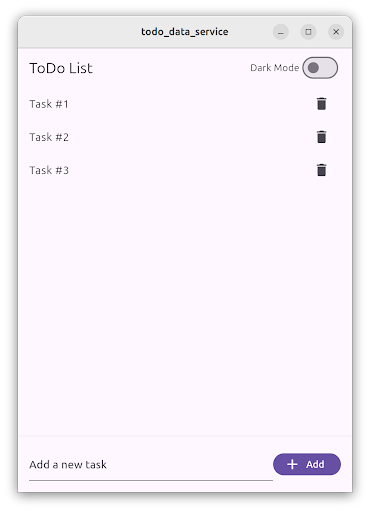 The body of the application contains the `TodoListScreen`.
This screen contains a `ListView` of `ListTile` items,
each one representing a ToDo item.
At the bottom, a `TextField` allows users to create new ToDo items
by writing the task description and then tapping on the “Add” `FilledButton`.
应用主体由 `TodoListScreen` 构成。
该界面包含一个由 `ListTile` widget 组成的 `ListView` 列表,
其中每一项代表一个待办事项。
在底部,`TextField` 允许用户通过输入任务描述,
然后点击带有 “Add” 字样的 `FilledButton` 来创建新的待办事项。
Users can tap on the delete `IconButton` to delete the ToDo item.
用户可以点击带有垃圾桶图标的“删除” `IconButton` 来删除待办事项。
The list of ToDo items is stored locally using a database service,
and restored when the user starts the application.
待办事项列表使用数据库服务来实现本地存储,
并在用户启动应用程序时重新加载到应用中。
:::note
The full, runnable source-code for this example is
available in [`/examples/app-architecture/todo_data_service/`][].
此示例完整且可运行的源代码,
可在 [`/examples/app-architecture/todo_data_service/`][] 中找到。
:::
## Storing complex data with SQL
## 采用 SQL 存储复杂数据
This functionality follows the recommended [Flutter Architecture design][],
containing a UI layer and a data layer.
Additionally, in the domain layer you will find the data model used.
此功能遵循推荐的 [Flutter 架构设计][Flutter Architecture design],
包含 UI 层 (UI Layer) 和数据层 (Data Layer)。
此外,数据模型则定义在领域层 (Domain Layer) 中。
- UI layer with `TodoListScreen` and `TodoListViewModel`
UI 层 (UI Layer) 由 `TodoListScreen` 和 `TodoListViewModel` 构成。
- Domain layer with `Todo` data class
领域层 (Domain Layer) 由定义业务数据模型的 `Todo` 数据类构成。
- Data layer with `TodoRepository` and `DatabaseService`
数据层 (Data Layer) 由 `TodoRepository` 和 `DatabaseService` 构成。
### ToDo list presentation layer
### 待办事项 UI 层
The `TodoListScreen` is a Widget that contains the UI in charge of displaying
and creating the ToDo items.
It follows the [MVVM pattern][]
and is accompanied by the `TodoListViewModel`,
which contains the list of ToDo items
and three commands to load, add, and delete ToDo items.
`TodoListScreen` 是一个用于显示和创建待办事项的 UI Widget。
它遵循 [MVVM 模式][MVVM pattern],
由 `TodoListViewModel` 负责维护待办事项列表,
并封装了加载、添加和删除待办事项列表这三项操作。
This screen is divided into two parts,
one containing the list of ToDo items,
implemented using a `ListView`,
and the other is a `TextField`
and a `Button`, used for creating new ToDo items.
此界面由两部分组成:
其一采用 `ListView` 实现的待办事项列表,
其二用于创建新待办事项的 `TextField` 和 `Button`。
The `ListView` is wrapped by a `ListenableBuilder`,
which listens to changes in the `TodoListViewModel`,
and shows a `ListTile` for each ToDo item.
`ListView` 外层包裹着 `ListenableBuilder`,
它通过监听 `TodoListViewModel` 的数据变化,
从而为每个待办事项显示对应的 `ListTile`。
```dart
ListenableBuilder(
listenable: widget.viewModel,
builder: (context, child) {
return ListView.builder(
itemCount: widget.viewModel.todos.length,
itemBuilder: (context, index) {
final todo = widget.viewModel.todos[index];
return ListTile(
title: Text(todo.task),
trailing: IconButton(
icon: const Icon(Icons.delete),
onPressed: () => widget.viewModel.delete.execute(todo.id),
),
);
},
);
},
)
```
The list of ToDo items is defined in the `TodoListViewModel`,
and loaded by the `load` command.
This method calls the `TodoRepository` and fetches the list of ToDo items.
待办事项列表定义于 `TodoListViewModel` 中,
并由 `load` 命令负责加载。
该方法会调用 `TodoRepository` 来获取待办事项列表。
```dart
List _todos = [];
List get todos => _todos;
Future> _load() async {
try {
final result = await _todoRepository.fetchTodos();
switch (result) {
case Ok>():
_todos = result.value;
return Result.ok(null);
case Error():
return Result.error(result.error);
}
} on Exception catch (e) {
return Result.error(e);
} finally {
notifyListeners();
}
}
```
Pressing the `FilledButton`,
executes the `add` command
and passes in the text controller value.
当点击 `FilledButton` 时,
会执行 `add` 命令,
此时文本控制器的当前值将作为参数被传入。
```dart
FilledButton.icon(
onPressed: () =>
widget.viewModel.add.execute(_controller.text),
label: const Text('Add'),
icon: const Icon(Icons.add),
)
```
The `add` command then calls the `TodoRepository.createTodo()` method
with the task description text and it creates a new ToDo item.
`add` 命令随即调用 `TodoRepository.createTodo()` 方法,
并传入用户输入的任务描述文本,从而创建一个新的待办事项。
The `createTodo()` method returns the newly created ToDo,
which is then added to the `_todo` list in the view model.
`createTodo()` 方法返回新创建的待办事项,
然后将其添加到视图模型的 `_todo` 列表中。
ToDo items contain a unique identifier generated by the database.
This is why the view model doesn’t create the ToDo item,
but rather the `TodoRepository` does.
待办事项包含由数据库生成的唯一 ID。
正因如此,创建待办事项的职责由 `TodoRepository` 承担,
而非视图模型。
```dart
Future> _add(String task) async {
try {
final result = await _todoRepository.createTodo(task);
switch (result) {
case Ok():
_todos.add(result.value);
return Result.ok(null);
case Error():
return Result.error(result.error);
}
} on Exception catch (e) {
return Result.error(e);
} finally {
notifyListeners();
}
}
```
Finally, the `TodoListScreen` also listens to the result in the `add` command.
When the action completes, the `TextEditingController` is cleared.
最后,`TodoListScreen` 还会监听 `add` 命令的执行结果,
并在操作完成后清空 `TextEditingController` 中的内容。
```dart
void _onAdd() {
// Clear the text field when the add command completes.
if (widget.viewModel.add.completed) {
widget.viewModel.add.clearResult();
_controller.clear();
}
}
```
When a user taps on the `IconButton` in the `ListTile`, the delete command is executed.
当用户点击 `ListTile` 中的 `IconButton` 时,执行删除命令。
```dart
IconButton(
icon: const Icon(Icons.delete),
onPressed: () => widget.viewModel.delete.execute(todo.id),
)
```
Then, the view model calls the `TodoRepository.deleteTodo()` method,
passing the unique ToDo item identifier.
A correct result removes the ToDo item from the view
model *and* the screen.
然后,视图模型调用 `TodoRepository.deleteTodo()` 方法,
传入唯一的待办事项标识符。
与之相符的结果会被程序从视图模型和屏幕中移除。
```dart
Future> _delete(int id) async {
try {
final result = await _todoRepository.deleteTodo(id);
switch (result) {
case Ok():
_todos.removeWhere((todo) => todo.id == id);
return Result.ok(null);
case Error():
return Result.error(result.error);
}
} on Exception catch (e) {
return Result.error(e);
} finally {
notifyListeners();
}
}
```
### Todo list domain layer
### 待办事项领域层
The domain layer of this example application contains
the `Todo` item data model.
此示例应用程序的领域层 (Domain Layer) 包含
`Todo` 待办事项的数据模型。
Items are presented by an immutable data class.
In this case, the application uses the `freezed` package to generate the code.
数据项由不可变数据类 (Immutable Data) 进行定义。
在本示例具体实现中,使用 `freezed` package 来自动生成相关代码。
The class has two properties, an ID represented by an `int`,
and a task description, represented by a `String`.
该类定义了两个属性:
ID(`int` 类型)和待办任务描述(`String` 类型)。
```dart
@freezed
abstract class Todo with _$Todo {
const factory Todo({
/// The unique identifier of the Todo item.
required int id,
/// The task description of the Todo item.
required String task,
}) = _Todo;
}
```
### Todo list data layer
### 待办事项数据层
The data layer of this functionality is composed of two classes,
the `TodoRepository` and the `DatabaseService`.
该功能的数据层由 `TodoRepository` 和 `DatabaseService` 这两个类组成。
The `TodoRepository` acts as the source of truth for all the ToDo items.
View models must use this repository to access to the ToDo list,
and it should not expose any implementation details on how they are stored.
`TodoRepository` 是所有待办事项的单一数据源。
视图模型必须通过该 repository 访问待办事项列表,
且不应暴露任何关于其存储方式的实现细节。
Internally, the `TodoRepository` uses the `DatabaseService`,
which implements the access to the SQL database using the `sqflite` package.
You can implement the same `DatabaseService` using other storage packages
like `sqlite3`, `drift` or even cloud storage solutions like `firebase_database`.
在内部,`TodoRepository` 使用 `DatabaseService`,
它通过 `sqflite` package 实现 SQL 数据库的访问。
你可以使用其他存储 package,如 `sqlite3`、`drift`,甚至云存储解决方案,如 `firebase_database`,
来实现相同的 `DatabaseService`。
The `TodoRepository` checks if the database is open
before every request and opens it if necessary.
`TodoRepository` 在每次执行请求前,
均会检查数据库的连接状态,
并在未开启时建立数据库连接。
It implements the `fetchTodos()`, `createTodo()`, and `deleteTodo()` methods.
它实现了 `fetchTodos()`、 `createTodo()` 和 `deleteTodo()` 方法。
```dart
class TodoRepository {
TodoRepository({required this._database});
final DatabaseService _database;
Future>> fetchTodos() async {
if (!_database.isOpen()) {
await _database.open();
}
return _database.getAll();
}
Future> createTodo(String task) async {
if (!_database.isOpen()) {
await _database.open();
}
return _database.insert(task);
}
Future> deleteTodo(int id) async {
if (!_database.isOpen()) {
await _database.open();
}
return _database.delete(id);
}
}
```
The `DatabaseService` implements the access to the SQLite database
using the `sqflite` package.
`DatabaseService` 通过 `sqflite` package 实现了对 SQLite 数据库的访问。
It’s a good idea to define the table and column names as constants
to avoid typos when writing SQL code.
在编写 SQL 代码时,建议将表名和列名定义为常量,这样可以避免拼写错误。
```dart
static const String _todoTableName = 'todo';
static const String _idColumnName = '_id';
static const String _taskColumnName = 'task';
```
The `open()` method opens the existing database,
or creates a new one if it doesn’t exist.
```dart
Future open() async {
_database = await databaseFactory.openDatabase(
join(await databaseFactory.getDatabasesPath(), 'app_database.db'),
options: OpenDatabaseOptions(
onCreate: (db, version) {
return db.execute(
'CREATE TABLE $_todoTableName($_idColumnName INTEGER PRIMARY KEY AUTOINCREMENT, $_taskColumnName TEXT)',
);
},
version: 1,
),
);
}
```
Note that the column `id` is set as `primary key` and `autoincrement`;
this means that each newly inserted item
is assigned a new value for the `id` column.
请注意,`id` 列被设置为 `primary key` 和 `autoincrement`,
这意味着每条新插入的数据都会为 `id` 列分配一个唯一的递增值。
The `insert()` method creates a new ToDo item in the database,
and returns a newly created Todo instance.
The `id` is generated as mentioned before.
`insert()` 方法在数据库中创建一个新的待办事项,
并返回一个新创建的 Todo 实例。
其中 `id` 的值会按照上述机制来自动生成。
```dart
Future> insert(String task) async {
try {
final id = await _database!.insert(_todoTableName, {
_taskColumnName: task,
});
return Result.ok(Todo(id: id, task: task));
} on Exception catch (e) {
return Result.error(e);
}
}
```
All the `DatabaseService` operations use the `Result` class to return a value,
as recommended by the [Flutter architecture recommendations][].
This facilitates handling errors in further steps in the application code.
所有 `DatabaseService` 操作都使用 `Result` 类来返回值,
正如 [Flutter 架构建议][Flutter architecture recommendations] 的那样。
这有助于在应用程序代码的后续步骤中处理错误。
The `getAll()` method performs a database query,
obtaining all the values in the `id` and `task` columns.
For each entry, it creates a `Todo` class instance.
`getAll()` 方法执行数据库查询,
获取 `id` 和 `task` 列中的所有值。
对于每一条记录,它创建一个 `Todo` 类的实例。
```dart
Future>> getAll() async {
try {
final entries = await _database!.query(
_todoTableName,
columns: [_idColumnName, _taskColumnName],
);
final list = entries
.map(
(element) => Todo(
id: element[_idColumnName] as int,
task: element[_taskColumnName] as String,
),
)
.toList();
return Result.ok(list);
} on Exception catch (e) {
return Result.error(e);
}
}
```
The `delete()` method performs a database delete operation
based on the ToDo item `id`.
`delete()` 方法根据待办事项的 `id` 来执行数据库删除操作。
In this case, if no items were deleted an error is returned,
indicating that something went wrong.
此时,如果没有删除任何数据项,将返回一个错误,
以表明该操作未能按预期完成。
```dart
Future> delete(int id) async {
try {
final rowsDeleted = await _database!.delete(
_todoTableName,
where: '$_idColumnName = ?',
whereArgs: [id],
);
if (rowsDeleted == 0) {
return Result.error(Exception('No todo found with id $id'));
}
return Result.ok(null);
} on Exception catch (e) {
return Result.error(e);
}
}
```
:::note
In some cases, you might want to close the database when you are done with it.
For example, when the user leaves the screen,
or after a certain time has passed.
在某些情况下,你可能希望在完成数据库操作后关闭它。
例如,当用户离开屏幕,
或经过一定时间后。
This depends on the database implementation
as well as your application requirements.
It’s recommended that you check with the database package authors
for recommendations.
这取决于数据库实现以及你的应用程序需求。
建议你咨询数据库 package 的作者以获取相关建议。
:::
## Putting it all together
## 总结
In the `main()` method of your application,
first initialize the `DatabaseService`,
which requires different initialization code on different platforms.
Then, pass the newly created `DatabaseService` into the `TodoRepository`
which is itself passed into the `MainApp` as a constructor argument dependency.
在应用程序的 `main()` 方法中,
首先初始化 `DatabaseService`(针对不同平台编写特定的初始化代码),
然后将新创建的 `DatabaseService` 实例注入 `TodoRepository`,
最后将 `TodoRepository` 作为构造依赖项注入 `MainApp`。
```dart
void main() {
late DatabaseService databaseService;
if (kIsWeb) {
throw UnsupportedError('Platform not supported');
} else if (Platform.isLinux || Platform.isWindows || Platform.isMacOS) {
// Initialize FFI SQLite
sqfliteFfiInit();
databaseService = DatabaseService(databaseFactory: databaseFactoryFfi);
} else {
// Use default native SQLite
databaseService = DatabaseService(databaseFactory: databaseFactory);
}
runApp(
MainApp(
// ···
todoRepository: TodoRepository(database: databaseService),
),
);
}
```
Then, when the `TodoListScreen` is created,
also create the `TodoListViewModel`
and pass the `TodoRepository` to it as dependency.
随后,在创建 `TodoListScreen` 时,
需要同步创建 `TodoListViewModel`,
并将 `TodoRepository` 作为其依赖项注入。
```dart
TodoListScreen(
viewModel: TodoListViewModel(todoRepository: widget.todoRepository),
)
```
[Flutter Architecture design]:/app-architecture
[Flutter architecture recommendations]:/app-architecture
[MVVM pattern]:/app-architecture/guide#mvvm
[Persist data with SQLite]:/cookbook/persistence/sqlite
[Persistent storage architecture: Key-value data]:/app-architecture/design-patterns/key-value-data
[`/examples/app-architecture/todo_data_service/`]: https://github.com/cfug/flutter.cn/tree/main/examples/app-architecture/todo_data_service/
[`sqflite_common_ffi_web`]:https://pub-web.flutter-io.cn/packages/sqflite_common_ffi_web
[`sqflite_common_ffi`]:https://pub-web.flutter-io.cn/packages/sqflite_common_ffi
[`sqflite`]:https://pub-web.flutter-io.cn/packages/sqflite
The body of the application contains the `TodoListScreen`.
This screen contains a `ListView` of `ListTile` items,
each one representing a ToDo item.
At the bottom, a `TextField` allows users to create new ToDo items
by writing the task description and then tapping on the “Add” `FilledButton`.
应用主体由 `TodoListScreen` 构成。
该界面包含一个由 `ListTile` widget 组成的 `ListView` 列表,
其中每一项代表一个待办事项。
在底部,`TextField` 允许用户通过输入任务描述,
然后点击带有 “Add” 字样的 `FilledButton` 来创建新的待办事项。
Users can tap on the delete `IconButton` to delete the ToDo item.
用户可以点击带有垃圾桶图标的“删除” `IconButton` 来删除待办事项。
The list of ToDo items is stored locally using a database service,
and restored when the user starts the application.
待办事项列表使用数据库服务来实现本地存储,
并在用户启动应用程序时重新加载到应用中。
:::note
The full, runnable source-code for this example is
available in [`/examples/app-architecture/todo_data_service/`][].
此示例完整且可运行的源代码,
可在 [`/examples/app-architecture/todo_data_service/`][] 中找到。
:::
## Storing complex data with SQL
## 采用 SQL 存储复杂数据
This functionality follows the recommended [Flutter Architecture design][],
containing a UI layer and a data layer.
Additionally, in the domain layer you will find the data model used.
此功能遵循推荐的 [Flutter 架构设计][Flutter Architecture design],
包含 UI 层 (UI Layer) 和数据层 (Data Layer)。
此外,数据模型则定义在领域层 (Domain Layer) 中。
- UI layer with `TodoListScreen` and `TodoListViewModel`
UI 层 (UI Layer) 由 `TodoListScreen` 和 `TodoListViewModel` 构成。
- Domain layer with `Todo` data class
领域层 (Domain Layer) 由定义业务数据模型的 `Todo` 数据类构成。
- Data layer with `TodoRepository` and `DatabaseService`
数据层 (Data Layer) 由 `TodoRepository` 和 `DatabaseService` 构成。
### ToDo list presentation layer
### 待办事项 UI 层
The `TodoListScreen` is a Widget that contains the UI in charge of displaying
and creating the ToDo items.
It follows the [MVVM pattern][]
and is accompanied by the `TodoListViewModel`,
which contains the list of ToDo items
and three commands to load, add, and delete ToDo items.
`TodoListScreen` 是一个用于显示和创建待办事项的 UI Widget。
它遵循 [MVVM 模式][MVVM pattern],
由 `TodoListViewModel` 负责维护待办事项列表,
并封装了加载、添加和删除待办事项列表这三项操作。
This screen is divided into two parts,
one containing the list of ToDo items,
implemented using a `ListView`,
and the other is a `TextField`
and a `Button`, used for creating new ToDo items.
此界面由两部分组成:
其一采用 `ListView` 实现的待办事项列表,
其二用于创建新待办事项的 `TextField` 和 `Button`。
The `ListView` is wrapped by a `ListenableBuilder`,
which listens to changes in the `TodoListViewModel`,
and shows a `ListTile` for each ToDo item.
`ListView` 外层包裹着 `ListenableBuilder`,
它通过监听 `TodoListViewModel` 的数据变化,
从而为每个待办事项显示对应的 `ListTile`。
```dart
ListenableBuilder(
listenable: widget.viewModel,
builder: (context, child) {
return ListView.builder(
itemCount: widget.viewModel.todos.length,
itemBuilder: (context, index) {
final todo = widget.viewModel.todos[index];
return ListTile(
title: Text(todo.task),
trailing: IconButton(
icon: const Icon(Icons.delete),
onPressed: () => widget.viewModel.delete.execute(todo.id),
),
);
},
);
},
)
```
The list of ToDo items is defined in the `TodoListViewModel`,
and loaded by the `load` command.
This method calls the `TodoRepository` and fetches the list of ToDo items.
待办事项列表定义于 `TodoListViewModel` 中,
并由 `load` 命令负责加载。
该方法会调用 `TodoRepository` 来获取待办事项列表。
```dart
List _todos = [];
List get todos => _todos;
Future> _load() async {
try {
final result = await _todoRepository.fetchTodos();
switch (result) {
case Ok>():
_todos = result.value;
return Result.ok(null);
case Error():
return Result.error(result.error);
}
} on Exception catch (e) {
return Result.error(e);
} finally {
notifyListeners();
}
}
```
Pressing the `FilledButton`,
executes the `add` command
and passes in the text controller value.
当点击 `FilledButton` 时,
会执行 `add` 命令,
此时文本控制器的当前值将作为参数被传入。
```dart
FilledButton.icon(
onPressed: () =>
widget.viewModel.add.execute(_controller.text),
label: const Text('Add'),
icon: const Icon(Icons.add),
)
```
The `add` command then calls the `TodoRepository.createTodo()` method
with the task description text and it creates a new ToDo item.
`add` 命令随即调用 `TodoRepository.createTodo()` 方法,
并传入用户输入的任务描述文本,从而创建一个新的待办事项。
The `createTodo()` method returns the newly created ToDo,
which is then added to the `_todo` list in the view model.
`createTodo()` 方法返回新创建的待办事项,
然后将其添加到视图模型的 `_todo` 列表中。
ToDo items contain a unique identifier generated by the database.
This is why the view model doesn’t create the ToDo item,
but rather the `TodoRepository` does.
待办事项包含由数据库生成的唯一 ID。
正因如此,创建待办事项的职责由 `TodoRepository` 承担,
而非视图模型。
```dart
Future> _add(String task) async {
try {
final result = await _todoRepository.createTodo(task);
switch (result) {
case Ok():
_todos.add(result.value);
return Result.ok(null);
case Error():
return Result.error(result.error);
}
} on Exception catch (e) {
return Result.error(e);
} finally {
notifyListeners();
}
}
```
Finally, the `TodoListScreen` also listens to the result in the `add` command.
When the action completes, the `TextEditingController` is cleared.
最后,`TodoListScreen` 还会监听 `add` 命令的执行结果,
并在操作完成后清空 `TextEditingController` 中的内容。
```dart
void _onAdd() {
// Clear the text field when the add command completes.
if (widget.viewModel.add.completed) {
widget.viewModel.add.clearResult();
_controller.clear();
}
}
```
When a user taps on the `IconButton` in the `ListTile`, the delete command is executed.
当用户点击 `ListTile` 中的 `IconButton` 时,执行删除命令。
```dart
IconButton(
icon: const Icon(Icons.delete),
onPressed: () => widget.viewModel.delete.execute(todo.id),
)
```
Then, the view model calls the `TodoRepository.deleteTodo()` method,
passing the unique ToDo item identifier.
A correct result removes the ToDo item from the view
model *and* the screen.
然后,视图模型调用 `TodoRepository.deleteTodo()` 方法,
传入唯一的待办事项标识符。
与之相符的结果会被程序从视图模型和屏幕中移除。
```dart
Future> _delete(int id) async {
try {
final result = await _todoRepository.deleteTodo(id);
switch (result) {
case Ok():
_todos.removeWhere((todo) => todo.id == id);
return Result.ok(null);
case Error():
return Result.error(result.error);
}
} on Exception catch (e) {
return Result.error(e);
} finally {
notifyListeners();
}
}
```
### Todo list domain layer
### 待办事项领域层
The domain layer of this example application contains
the `Todo` item data model.
此示例应用程序的领域层 (Domain Layer) 包含
`Todo` 待办事项的数据模型。
Items are presented by an immutable data class.
In this case, the application uses the `freezed` package to generate the code.
数据项由不可变数据类 (Immutable Data) 进行定义。
在本示例具体实现中,使用 `freezed` package 来自动生成相关代码。
The class has two properties, an ID represented by an `int`,
and a task description, represented by a `String`.
该类定义了两个属性:
ID(`int` 类型)和待办任务描述(`String` 类型)。
```dart
@freezed
abstract class Todo with _$Todo {
const factory Todo({
/// The unique identifier of the Todo item.
required int id,
/// The task description of the Todo item.
required String task,
}) = _Todo;
}
```
### Todo list data layer
### 待办事项数据层
The data layer of this functionality is composed of two classes,
the `TodoRepository` and the `DatabaseService`.
该功能的数据层由 `TodoRepository` 和 `DatabaseService` 这两个类组成。
The `TodoRepository` acts as the source of truth for all the ToDo items.
View models must use this repository to access to the ToDo list,
and it should not expose any implementation details on how they are stored.
`TodoRepository` 是所有待办事项的单一数据源。
视图模型必须通过该 repository 访问待办事项列表,
且不应暴露任何关于其存储方式的实现细节。
Internally, the `TodoRepository` uses the `DatabaseService`,
which implements the access to the SQL database using the `sqflite` package.
You can implement the same `DatabaseService` using other storage packages
like `sqlite3`, `drift` or even cloud storage solutions like `firebase_database`.
在内部,`TodoRepository` 使用 `DatabaseService`,
它通过 `sqflite` package 实现 SQL 数据库的访问。
你可以使用其他存储 package,如 `sqlite3`、`drift`,甚至云存储解决方案,如 `firebase_database`,
来实现相同的 `DatabaseService`。
The `TodoRepository` checks if the database is open
before every request and opens it if necessary.
`TodoRepository` 在每次执行请求前,
均会检查数据库的连接状态,
并在未开启时建立数据库连接。
It implements the `fetchTodos()`, `createTodo()`, and `deleteTodo()` methods.
它实现了 `fetchTodos()`、 `createTodo()` 和 `deleteTodo()` 方法。
```dart
class TodoRepository {
TodoRepository({required this._database});
final DatabaseService _database;
Future>> fetchTodos() async {
if (!_database.isOpen()) {
await _database.open();
}
return _database.getAll();
}
Future> createTodo(String task) async {
if (!_database.isOpen()) {
await _database.open();
}
return _database.insert(task);
}
Future> deleteTodo(int id) async {
if (!_database.isOpen()) {
await _database.open();
}
return _database.delete(id);
}
}
```
The `DatabaseService` implements the access to the SQLite database
using the `sqflite` package.
`DatabaseService` 通过 `sqflite` package 实现了对 SQLite 数据库的访问。
It’s a good idea to define the table and column names as constants
to avoid typos when writing SQL code.
在编写 SQL 代码时,建议将表名和列名定义为常量,这样可以避免拼写错误。
```dart
static const String _todoTableName = 'todo';
static const String _idColumnName = '_id';
static const String _taskColumnName = 'task';
```
The `open()` method opens the existing database,
or creates a new one if it doesn’t exist.
```dart
Future open() async {
_database = await databaseFactory.openDatabase(
join(await databaseFactory.getDatabasesPath(), 'app_database.db'),
options: OpenDatabaseOptions(
onCreate: (db, version) {
return db.execute(
'CREATE TABLE $_todoTableName($_idColumnName INTEGER PRIMARY KEY AUTOINCREMENT, $_taskColumnName TEXT)',
);
},
version: 1,
),
);
}
```
Note that the column `id` is set as `primary key` and `autoincrement`;
this means that each newly inserted item
is assigned a new value for the `id` column.
请注意,`id` 列被设置为 `primary key` 和 `autoincrement`,
这意味着每条新插入的数据都会为 `id` 列分配一个唯一的递增值。
The `insert()` method creates a new ToDo item in the database,
and returns a newly created Todo instance.
The `id` is generated as mentioned before.
`insert()` 方法在数据库中创建一个新的待办事项,
并返回一个新创建的 Todo 实例。
其中 `id` 的值会按照上述机制来自动生成。
```dart
Future> insert(String task) async {
try {
final id = await _database!.insert(_todoTableName, {
_taskColumnName: task,
});
return Result.ok(Todo(id: id, task: task));
} on Exception catch (e) {
return Result.error(e);
}
}
```
All the `DatabaseService` operations use the `Result` class to return a value,
as recommended by the [Flutter architecture recommendations][].
This facilitates handling errors in further steps in the application code.
所有 `DatabaseService` 操作都使用 `Result` 类来返回值,
正如 [Flutter 架构建议][Flutter architecture recommendations] 的那样。
这有助于在应用程序代码的后续步骤中处理错误。
The `getAll()` method performs a database query,
obtaining all the values in the `id` and `task` columns.
For each entry, it creates a `Todo` class instance.
`getAll()` 方法执行数据库查询,
获取 `id` 和 `task` 列中的所有值。
对于每一条记录,它创建一个 `Todo` 类的实例。
```dart
Future>> getAll() async {
try {
final entries = await _database!.query(
_todoTableName,
columns: [_idColumnName, _taskColumnName],
);
final list = entries
.map(
(element) => Todo(
id: element[_idColumnName] as int,
task: element[_taskColumnName] as String,
),
)
.toList();
return Result.ok(list);
} on Exception catch (e) {
return Result.error(e);
}
}
```
The `delete()` method performs a database delete operation
based on the ToDo item `id`.
`delete()` 方法根据待办事项的 `id` 来执行数据库删除操作。
In this case, if no items were deleted an error is returned,
indicating that something went wrong.
此时,如果没有删除任何数据项,将返回一个错误,
以表明该操作未能按预期完成。
```dart
Future> delete(int id) async {
try {
final rowsDeleted = await _database!.delete(
_todoTableName,
where: '$_idColumnName = ?',
whereArgs: [id],
);
if (rowsDeleted == 0) {
return Result.error(Exception('No todo found with id $id'));
}
return Result.ok(null);
} on Exception catch (e) {
return Result.error(e);
}
}
```
:::note
In some cases, you might want to close the database when you are done with it.
For example, when the user leaves the screen,
or after a certain time has passed.
在某些情况下,你可能希望在完成数据库操作后关闭它。
例如,当用户离开屏幕,
或经过一定时间后。
This depends on the database implementation
as well as your application requirements.
It’s recommended that you check with the database package authors
for recommendations.
这取决于数据库实现以及你的应用程序需求。
建议你咨询数据库 package 的作者以获取相关建议。
:::
## Putting it all together
## 总结
In the `main()` method of your application,
first initialize the `DatabaseService`,
which requires different initialization code on different platforms.
Then, pass the newly created `DatabaseService` into the `TodoRepository`
which is itself passed into the `MainApp` as a constructor argument dependency.
在应用程序的 `main()` 方法中,
首先初始化 `DatabaseService`(针对不同平台编写特定的初始化代码),
然后将新创建的 `DatabaseService` 实例注入 `TodoRepository`,
最后将 `TodoRepository` 作为构造依赖项注入 `MainApp`。
```dart
void main() {
late DatabaseService databaseService;
if (kIsWeb) {
throw UnsupportedError('Platform not supported');
} else if (Platform.isLinux || Platform.isWindows || Platform.isMacOS) {
// Initialize FFI SQLite
sqfliteFfiInit();
databaseService = DatabaseService(databaseFactory: databaseFactoryFfi);
} else {
// Use default native SQLite
databaseService = DatabaseService(databaseFactory: databaseFactory);
}
runApp(
MainApp(
// ···
todoRepository: TodoRepository(database: databaseService),
),
);
}
```
Then, when the `TodoListScreen` is created,
also create the `TodoListViewModel`
and pass the `TodoRepository` to it as dependency.
随后,在创建 `TodoListScreen` 时,
需要同步创建 `TodoListViewModel`,
并将 `TodoRepository` 作为其依赖项注入。
```dart
TodoListScreen(
viewModel: TodoListViewModel(todoRepository: widget.todoRepository),
)
```
[Flutter Architecture design]:/app-architecture
[Flutter architecture recommendations]:/app-architecture
[MVVM pattern]:/app-architecture/guide#mvvm
[Persist data with SQLite]:/cookbook/persistence/sqlite
[Persistent storage architecture: Key-value data]:/app-architecture/design-patterns/key-value-data
[`/examples/app-architecture/todo_data_service/`]: https://github.com/cfug/flutter.cn/tree/main/examples/app-architecture/todo_data_service/
[`sqflite_common_ffi_web`]:https://pub-web.flutter-io.cn/packages/sqflite_common_ffi_web
[`sqflite_common_ffi`]:https://pub-web.flutter-io.cn/packages/sqflite_common_ffi
[`sqflite`]:https://pub-web.flutter-io.cn/packages/sqflite