# 创建应用
> 如何创建新 Flutter 应用的说明。
Learn the first steps to building a Flutter app, from creating a project to understanding widgets and hot reload.
学习构建 Flutter 应用的第一步:从创建项目到理解 widget 与热重载。
title: 你将完成的内容
items:
- title: 使用 CLI 创建新的 Flutter 项目
icon: terminal
- title: 理解 widget 与 widget 树
icon: account_tree
- title: 运行应用并使用热重载
icon: bolt
---
### 你将构建的内容
In this first section of the Flutter tutorial,
you'll build the core UI of an app called 'Birdle',
a game similar to [Wordle, the popular New York Times game][].
在 Flutter 教程的第一部分,
你将构建名为「Birdle」的应用的核心 UI,
这是一款类似于 [Wordle,纽约时报的热门游戏][Wordle, the popular New York Times game] 的游戏。
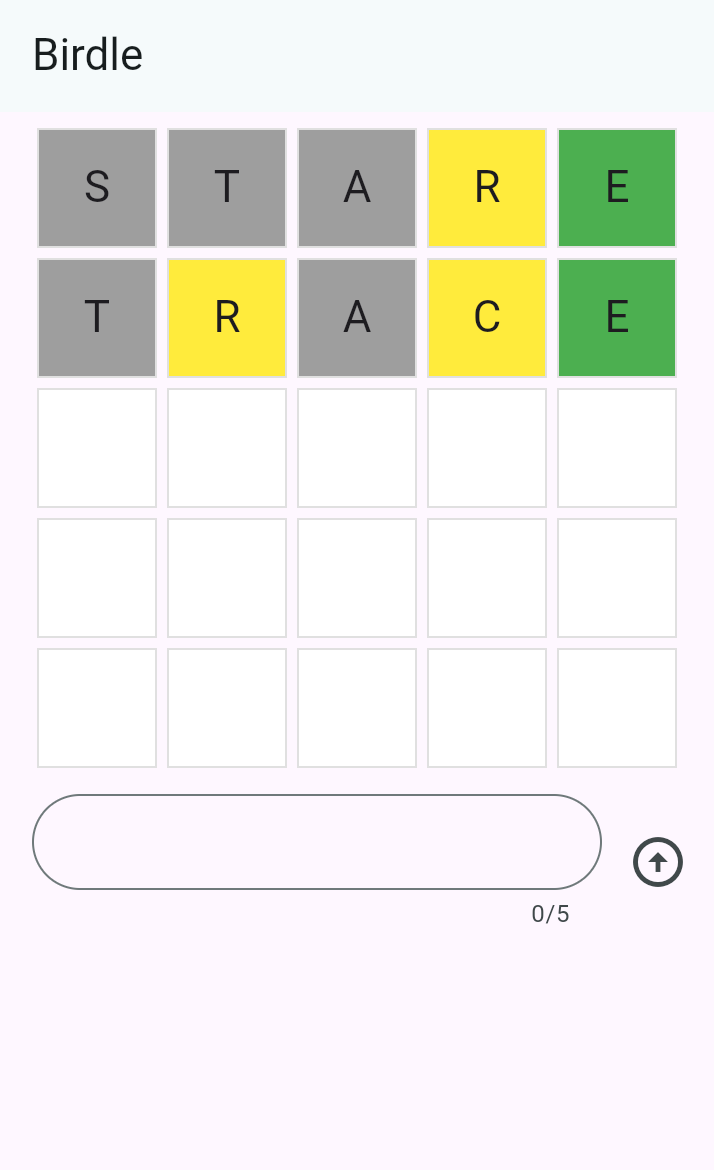 By the end of this tutorial, you'll have
learned the fundamentals of building Flutter UIs, and your app will
look like the following screenshot (and it'll even mostly work 😀).
学完本教程后,你将掌握构建 Flutter UI 的基础知识,你的应用将
与下面的截图相似(而且基本上还能正常运行 😀)。
[Wordle, the popular New York Times game]: https://www.nytimes.com/games/wordle/index.html
### 创建新的 Flutter 项目
The first step to building Flutter apps is to create a new project.
You create new apps with the [Flutter CLI tool][],
installed as part of the Flutter SDK.
构建 Flutter 应用的第一步是创建新项目。
你可以使用随 Flutter SDK 一起安装的 [Flutter CLI 工具][Flutter CLI tool] 创建新应用。
Open your terminal or command prompt and run
the following command to create a new Flutter project:
打开终端或命令提示符,运行
以下命令以创建新的 Flutter 项目:
```console
$ flutter create birdle --empty
```
This creates a new Flutter project using the minimal "empty" template.
这将使用精简的「empty」模板创建一个新的 Flutter 项目。
[Flutter CLI tool]: /reference/flutter-cli
### 查看代码
In your IDE, open the file at `lib/main.dart`.
Starting from the top, you'll see this code.
在 IDE 中打开 `lib/main.dart` 文件。
从文件顶部开始,你会看到以下代码。
```dart title="lib/main.dart"
void main() {
runApp(const MainApp());
}
```
The `main` function is the entry point to any Dart program,
and a Flutter app is just a **Dart** program.
The `runApp` method is part of the Flutter SDK,
and it takes a **widget** as an argument.
In this case, an instance of the `MainApp` widget is being passed in.
`main` 函数是任何 Dart 程序的入口点,
而 Flutter 应用本质上就是一个 **Dart** 程序。
`runApp` 方法是 Flutter SDK 的一部分,
它接受一个 **widget** 作为参数。
此处传入的是 `MainApp` widget 的一个实例。
Just below the `main` function, you'll find the `MainApp` class declaration.
在 `main` 函数正下方,你会找到 `MainApp` 类的声明。
```dart
class MainApp extends StatelessWidget {
const MainApp({super.key});
@override
Widget build(BuildContext context) {
return const MaterialApp(
home: Scaffold(
body: Center(
child: Text('Hello World!'),
),
),
);
}
}
```
`MainApp` is the **root widget**,
as it's the widget that's passed into `runApp`.
Within this widget, there's a `build` method that
returns another widget called `MaterialApp`.
Essentially, this is what a Flutter app is:
a composition of widgets that make
up a tree structure called the **widget tree.**
`MainApp` 是 **根 widget**,
因为它是传入 `runApp` 的 widget。
在这个 widget 内部,有一个 `build` 方法,
它返回名为 `MaterialApp` 的另一个 widget。
本质上,Flutter 应用就是这样:
由多个 widget 组合而成,构成称为 **widget 树** 的树形结构。
Your job as a Flutter developer is to
compose widgets from the SDK into larger, custom widgets that display a UI.
作为 Flutter 开发者,你的任务是将
SDK 中的 widget 组合成更大的自定义 widget,以展示 UI。
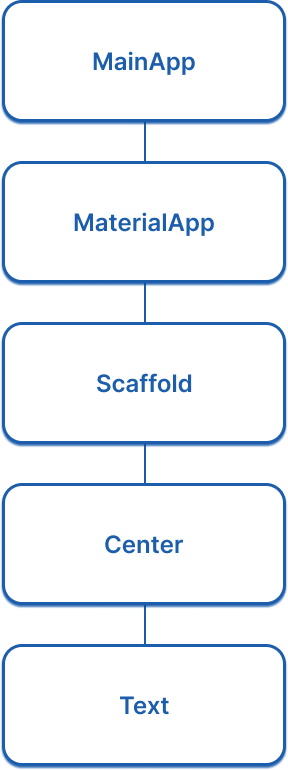
At the moment, the widget tree is quite simple:
目前,widget 树相当简单:
By the end of this tutorial, you'll have
learned the fundamentals of building Flutter UIs, and your app will
look like the following screenshot (and it'll even mostly work 😀).
学完本教程后,你将掌握构建 Flutter UI 的基础知识,你的应用将
与下面的截图相似(而且基本上还能正常运行 😀)。
[Wordle, the popular New York Times game]: https://www.nytimes.com/games/wordle/index.html
### 创建新的 Flutter 项目
The first step to building Flutter apps is to create a new project.
You create new apps with the [Flutter CLI tool][],
installed as part of the Flutter SDK.
构建 Flutter 应用的第一步是创建新项目。
你可以使用随 Flutter SDK 一起安装的 [Flutter CLI 工具][Flutter CLI tool] 创建新应用。
Open your terminal or command prompt and run
the following command to create a new Flutter project:
打开终端或命令提示符,运行
以下命令以创建新的 Flutter 项目:
```console
$ flutter create birdle --empty
```
This creates a new Flutter project using the minimal "empty" template.
这将使用精简的「empty」模板创建一个新的 Flutter 项目。
[Flutter CLI tool]: /reference/flutter-cli
### 查看代码
In your IDE, open the file at `lib/main.dart`.
Starting from the top, you'll see this code.
在 IDE 中打开 `lib/main.dart` 文件。
从文件顶部开始,你会看到以下代码。
```dart title="lib/main.dart"
void main() {
runApp(const MainApp());
}
```
The `main` function is the entry point to any Dart program,
and a Flutter app is just a **Dart** program.
The `runApp` method is part of the Flutter SDK,
and it takes a **widget** as an argument.
In this case, an instance of the `MainApp` widget is being passed in.
`main` 函数是任何 Dart 程序的入口点,
而 Flutter 应用本质上就是一个 **Dart** 程序。
`runApp` 方法是 Flutter SDK 的一部分,
它接受一个 **widget** 作为参数。
此处传入的是 `MainApp` widget 的一个实例。
Just below the `main` function, you'll find the `MainApp` class declaration.
在 `main` 函数正下方,你会找到 `MainApp` 类的声明。
```dart
class MainApp extends StatelessWidget {
const MainApp({super.key});
@override
Widget build(BuildContext context) {
return const MaterialApp(
home: Scaffold(
body: Center(
child: Text('Hello World!'),
),
),
);
}
}
```
`MainApp` is the **root widget**,
as it's the widget that's passed into `runApp`.
Within this widget, there's a `build` method that
returns another widget called `MaterialApp`.
Essentially, this is what a Flutter app is:
a composition of widgets that make
up a tree structure called the **widget tree.**
`MainApp` 是 **根 widget**,
因为它是传入 `runApp` 的 widget。
在这个 widget 内部,有一个 `build` 方法,
它返回名为 `MaterialApp` 的另一个 widget。
本质上,Flutter 应用就是这样:
由多个 widget 组合而成,构成称为 **widget 树** 的树形结构。
Your job as a Flutter developer is to
compose widgets from the SDK into larger, custom widgets that display a UI.
作为 Flutter 开发者,你的任务是将
SDK 中的 widget 组合成更大的自定义 widget,以展示 UI。
At the moment, the widget tree is quite simple:
目前,widget 树相当简单:
 ### 运行应用
1. In your terminal,
navigate to the root directory of your created Flutter app:
在终端中,
进入你创建的 Flutter 应用的根目录:
```console
$ cd birdle
```
1. Run the app using the Flutter CLI tool.
使用 Flutter CLI 工具运行应用。
```console
$ flutter run -d chrome
```
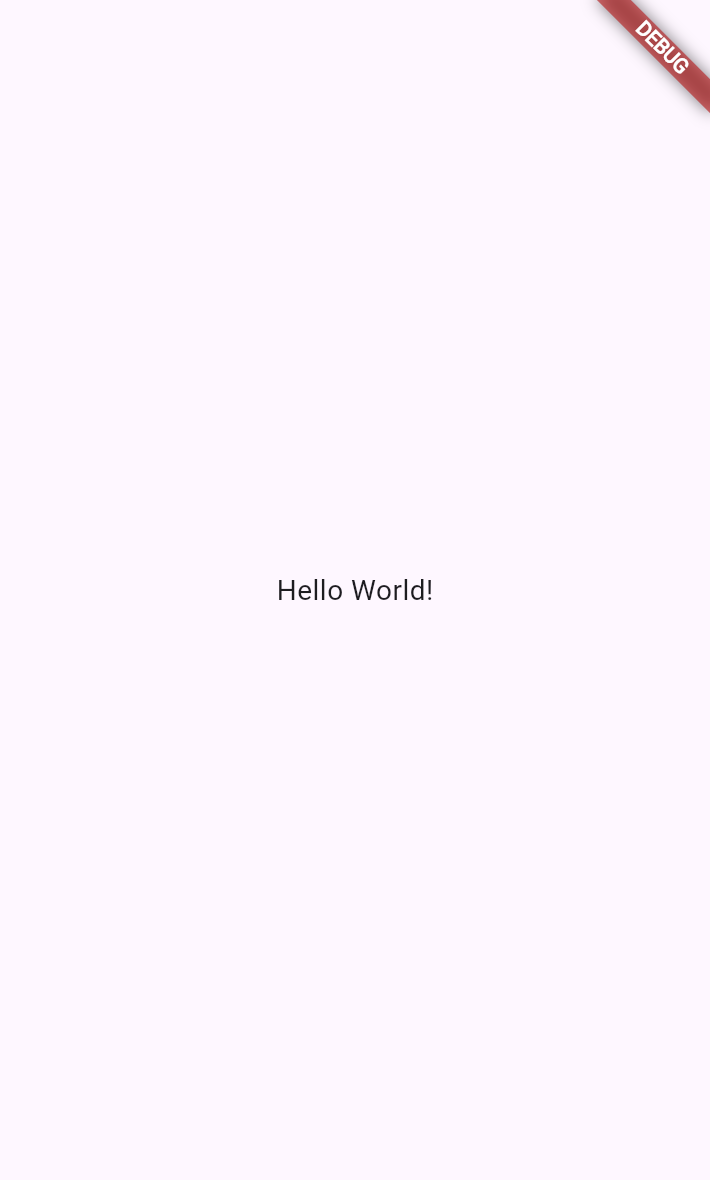
The app will build and launch in a new instance of Chrome.
应用将在新的 Chrome 实例中构建并启动。
### 运行应用
1. In your terminal,
navigate to the root directory of your created Flutter app:
在终端中,
进入你创建的 Flutter 应用的根目录:
```console
$ cd birdle
```
1. Run the app using the Flutter CLI tool.
使用 Flutter CLI 工具运行应用。
```console
$ flutter run -d chrome
```
The app will build and launch in a new instance of Chrome.
应用将在新的 Chrome 实例中构建并启动。
 ### 使用热重载
**Stateful hot reload**, if you haven't heard of it,
allows a running Flutter app to re-render updated business logic or UI code in
less than a second – all without losing your place in the app.
如果你还没听说过 **有状态热重载**,
它可以让正在运行的 Flutter 应用在不到一秒内
重新渲染更新后的业务逻辑或 UI 代码——而且不会丢失你在应用中的当前位置。
In your IDE, open the `main.dart` file and navigate to line ~15 and find this
code:
在 IDE 中打开 `main.dart` 文件,定位到约第 15 行,找到以下
代码:
```dart
child: Text('Hello World!'),
```
Change the text inside the string to anything you want.
Then, hot-reload your app by
pressing `r` in the terminal where the app is running.
The running app should instantly show your updated text.
将字符串中的文本改为你想要的任何内容。
然后,在运行应用的终端中按 `r` 进行热重载。
正在运行的应用应立即显示你更新后的文本。
### 回顾
title: 你完成的内容
subtitle: 以下是你本课构建与学习内容的摘要。
completed: true
items:
- title: 创建了第一个 Flutter 项目
icon: terminal
details: >-
你使用带 `--empty` 标志的 `flutter create` 搭建了
一个精简的 Flutter 项目。
CLI 会生成项目结构和
入门所需的样板代码。
- title: 探索了 widget 树
icon: account_tree
details: >-
Flutter UI 通过将 **widget** 组合成树形结构来构建。
`runApp` 函数接受根 widget,该 widget 的
`build` 方法返回其他 widget,形成 **widget 树**。
作为 Flutter 开发者,你的任务是
将这些 widget 组合成自定义 UI。
- title: 使用热重载运行了应用
icon: bolt
details: >-
你使用 `flutter run` 运行了应用,并
体验了 **有状态热重载**,它让你
在不到一秒内看到代码变更的反映,且不会丢失应用状态。
在终端中按 `r` 可触发热重载。
### 自测
- question: "Flutter 应用中 `runApp` 函数的作用是什么?"
options:
- text: 它将 Dart 代码编译为原生机器码。
correct: false
explanation: "编译在应用运行之前完成;`runApp` 使用根 widget 启动 Flutter 框架。"
- text: 它接受一个 widget 作为参数,并将其设为 widget 树的根。
correct: true
explanation: "`runApp` 函数会展开给定的 widget 并将其附加到屏幕,使其成为 widget 树的根。"
- text: "它为项目创建 `main.dart` 文件。"
correct: false
explanation: "该文件由 `flutter create` 创建;`runApp` 在运行时调用。"
- text: 它从互联网下载 Flutter 依赖。
correct: false
explanation: "依赖由 `flutter pub get` 管理,而非 `runApp`。"
- question: 当 Flutter 应用在终端中运行时,如何触发热重载?
options:
- text: "在终端中按 `h`。"
correct: false
explanation: "按 `h` 会显示帮助选项;按 `r` 触发热重载。"
- text: "在终端中按 `r`。"
correct: true
explanation: "在运行应用的终端中按 `r` 会触发热重载。"
- text: "使用 `flutter run` 停止并重启应用。"
correct: false
explanation: 无需完全重启;热重载更快。
- text: 保存文件并等待自动重载。
correct: false
explanation: "默认情况下,你需要在终端中按 `r` 才能触发热重载。"
### 使用热重载
**Stateful hot reload**, if you haven't heard of it,
allows a running Flutter app to re-render updated business logic or UI code in
less than a second – all without losing your place in the app.
如果你还没听说过 **有状态热重载**,
它可以让正在运行的 Flutter 应用在不到一秒内
重新渲染更新后的业务逻辑或 UI 代码——而且不会丢失你在应用中的当前位置。
In your IDE, open the `main.dart` file and navigate to line ~15 and find this
code:
在 IDE 中打开 `main.dart` 文件,定位到约第 15 行,找到以下
代码:
```dart
child: Text('Hello World!'),
```
Change the text inside the string to anything you want.
Then, hot-reload your app by
pressing `r` in the terminal where the app is running.
The running app should instantly show your updated text.
将字符串中的文本改为你想要的任何内容。
然后,在运行应用的终端中按 `r` 进行热重载。
正在运行的应用应立即显示你更新后的文本。
### 回顾
title: 你完成的内容
subtitle: 以下是你本课构建与学习内容的摘要。
completed: true
items:
- title: 创建了第一个 Flutter 项目
icon: terminal
details: >-
你使用带 `--empty` 标志的 `flutter create` 搭建了
一个精简的 Flutter 项目。
CLI 会生成项目结构和
入门所需的样板代码。
- title: 探索了 widget 树
icon: account_tree
details: >-
Flutter UI 通过将 **widget** 组合成树形结构来构建。
`runApp` 函数接受根 widget,该 widget 的
`build` 方法返回其他 widget,形成 **widget 树**。
作为 Flutter 开发者,你的任务是
将这些 widget 组合成自定义 UI。
- title: 使用热重载运行了应用
icon: bolt
details: >-
你使用 `flutter run` 运行了应用,并
体验了 **有状态热重载**,它让你
在不到一秒内看到代码变更的反映,且不会丢失应用状态。
在终端中按 `r` 可触发热重载。
### 自测
- question: "Flutter 应用中 `runApp` 函数的作用是什么?"
options:
- text: 它将 Dart 代码编译为原生机器码。
correct: false
explanation: "编译在应用运行之前完成;`runApp` 使用根 widget 启动 Flutter 框架。"
- text: 它接受一个 widget 作为参数,并将其设为 widget 树的根。
correct: true
explanation: "`runApp` 函数会展开给定的 widget 并将其附加到屏幕,使其成为 widget 树的根。"
- text: "它为项目创建 `main.dart` 文件。"
correct: false
explanation: "该文件由 `flutter create` 创建;`runApp` 在运行时调用。"
- text: 它从互联网下载 Flutter 依赖。
correct: false
explanation: "依赖由 `flutter pub get` 管理,而非 `runApp`。"
- question: 当 Flutter 应用在终端中运行时,如何触发热重载?
options:
- text: "在终端中按 `h`。"
correct: false
explanation: "按 `h` 会显示帮助选项;按 `r` 触发热重载。"
- text: "在终端中按 `r`。"
correct: true
explanation: "在运行应用的终端中按 `r` 会触发热重载。"
- text: "使用 `flutter run` 停止并重启应用。"
correct: false
explanation: 无需完全重启;热重载更快。
- text: 保存文件并等待自动重载。
correct: false
explanation: "默认情况下,你需要在终端中按 `r` 才能触发热重载。"