# 简单动画
> 学习在 Flutter 中实现动画的最简单方式。
Flutter provides a rich set of animation APIs, and the simplest way to
start using them is with **implicit animations**.
"Implicit animations" refers to a group of widgets that
automatically animate changes to their properties without you
needing to manage any intermediate behavior.
Flutter 提供丰富的动画 API,
开始使用它们的最简单方式是 **隐式动画** (implicit animations)。
「隐式动画」指一类 widget,
它们会自动为属性变化添加动画,而你无需管理任何中间行为。
title: 你将完成的内容
items:
- title: 了解 Flutter 中的隐式动画
icon: auto_awesome
- title: 使用 AnimatedContainer 为属性变化添加动画
icon: animation
- title: 用 duration 和 curve 自定义时序
icon: timeline
In this lesson, you'll learn about one of the most common and
versatile implicit animation widgets: [`AnimatedContainer`][].
With just two additional lines of code, the background color of each `Tile`
animates to a new color in about half a second.
在本课中,你将了解最常见、
最灵活的隐式动画 widget 之一:[`AnimatedContainer`][]。
只需额外两行代码,每个 `Tile` 的背景色会在大约半秒内动画过渡到新颜色。
[`AnimatedContainer`]: https://api.flutter-io.cn/flutter/widgets/AnimatedContainer-class.html
---
### 将 `Container` 转换为 `AnimatedContainer`
Currently, the `Tile.build` method returns a `Container` to display a letter.
When the `hitType` changes, like from `HitType.none` to `HitType.hit`,
the background color of the tile changes instantly.
For example, from white to green in the case of `HitType.none` to `HitType.hit`.
目前,`Tile.build` 方法返回 `Container` 来显示字母。
当 `hitType` 变化时,例如从 `HitType.none` 变为 `HitType.hit`,
方块背景色会瞬间改变。
例如,在 `HitType.none` 到 `HitType.hit` 的情况下从白色变为绿色。
For reference, here's the current implementation of the `Tile` widget:
作为参考,这是 `Tile` widget 的当前实现:
```dart
class Tile extends StatelessWidget {
const Tile(this.letter, this.hitType, {super.key});
final String letter;
final HitType hitType;
@override
Widget build(BuildContext context) {
return Container(
height: 60,
width: 60,
decoration: BoxDecoration(
border: Border.all(color: Colors.grey.shade300),
color: switch (type) {
HitType.hit => Colors.green,
HitType.partial => Colors.yellow,
HitType.miss => Colors.grey,
_ => Colors.white,
},
),
child: Center(
child: Text(
letter.toUpperCase(),
style: Theme.of(context).textTheme.titleLarge,
),
),
);
}
}
```
To make the color change animate smoothly,
replace the `Container` widget with an `AnimatedContainer`.
要使颜色变化平滑动画,
将 `Container` widget 替换为 `AnimatedContainer`。
An `AnimatedContainer` is like a `Container`, but it
automatically animates changes to its properties over a specified `duration`.
When properties such as
`color`, `height`, `width`, `decoration`, or `alignment` change,
`AnimatedContainer` interpolates between the old and new values,
creating a smooth transition.
`AnimatedContainer` 类似 `Container`,
但会在指定的 `duration` 内自动为属性变化添加动画。
当 `color`、`height`、`width`、`decoration` 或 `alignment` 等属性变化时,
`AnimatedContainer` 会在旧值和新值之间插值,产生平滑过渡。
Modify your `Tile` widget as follows:
按如下方式修改 `Tile` widget:
```dart
class Tile extends StatelessWidget {
const Tile(this.letter, this.hitType, {super.key});
final String letter;
final HitType hitType;
@override
Widget build(BuildContext context) {
return AnimatedContainer(
duration: Duration(milliseconds: 500),
height: 60,
width: 60,
decoration: BoxDecoration(
border: Border.all(color: Colors.grey.shade300),
color: switch (hitType) {
HitType.hit => Colors.green,
HitType.partial => Colors.yellow,
HitType.miss => Colors.grey,
_ => Colors.white,
},
),
child: Center(
child: Text(
letter.toUpperCase(),
style: Theme.of(context).textTheme.titleLarge,
),
),
);
}
}
```
**`duration`** is a required property that
specifies how long the animation should take.
In this example, passing `Duration(milliseconds: 500)` means
the color transition will take half a second.
You can also specify seconds, minutes, and many other units of time.
**`duration`** 是必填属性,用于指定动画应持续多久。
在本例中,传入 `Duration(milliseconds: 500)` 表示颜色过渡将耗时半秒。
你也可以指定秒、分钟以及许多其他时间单位。
Now, when the `hitType` changes and the `Tile` widget rebuilds
(because `setState` was called in `GamePage`),
the color of the tile smoothly animates from its old color to
the new one over the specified duration.
现在,当 `hitType` 变化且 `Tile` widget 重建时
(因为在 `GamePage` 中调用了 `setState`),
方块颜色会在指定的 duration 内从其旧颜色平滑动画过渡到新颜色。
### 调整动画曲线
To add a bit of customization to an implicit animation,
you can pass it a different [`Curve`][].
Different curves change the speed of the animation
at different points throughout the animation.
要为隐式动画增加一点自定义,
可以传入不同的 [`Curve`][]。
不同曲线会在动画过程中的不同点
改变动画速度。
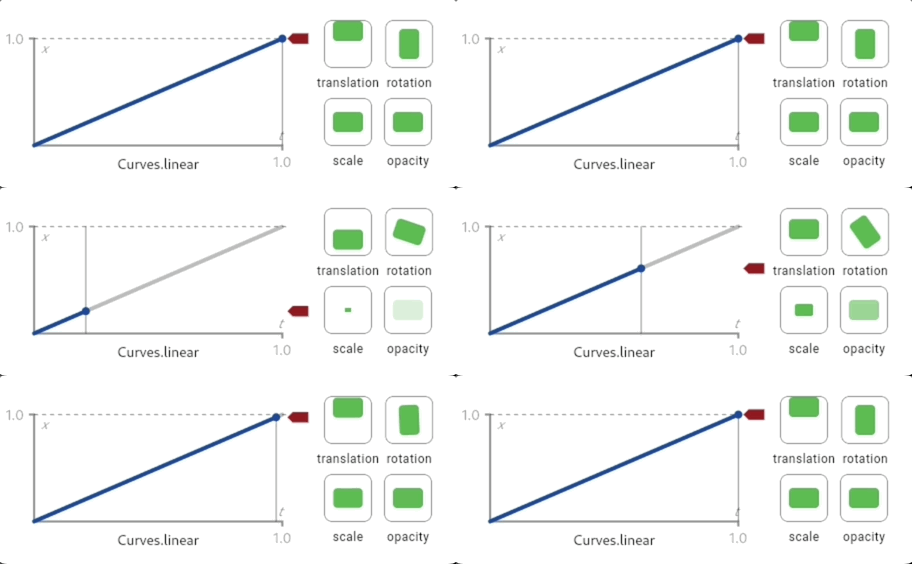
For example, the default curve for Flutter animations is `Curves.linear`. This gif shows how the animation curve behaves:
例如,Flutter 动画的默认曲线是 `Curves.linear`。此 gif 展示该动画曲线的表现:
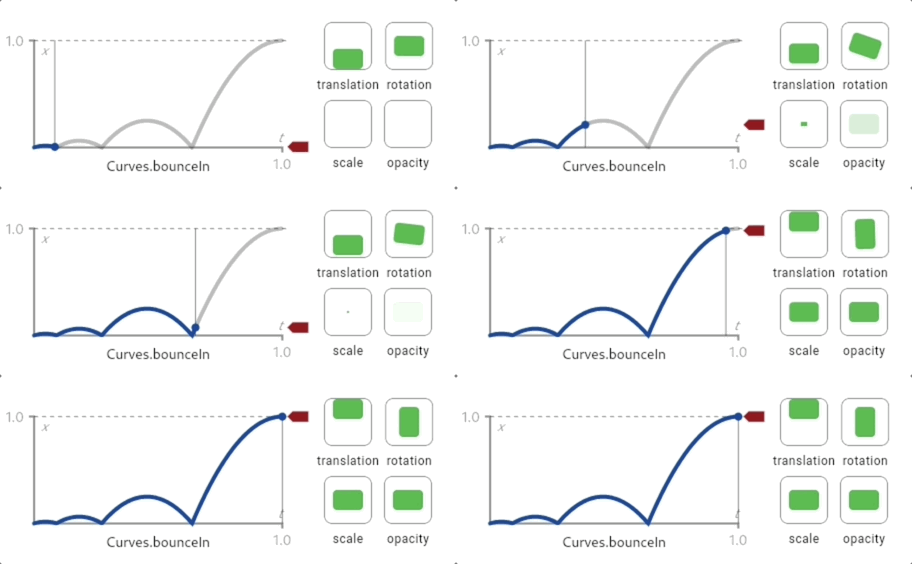
 Compare that to `Curve.bounceIn`, another common curve:
与之对比,`Curve.bounceIn` 是另一种常见曲线:
Compare that to `Curve.bounceIn`, another common curve:
与之对比,`Curve.bounceIn` 是另一种常见曲线:
 To change the `Curve` of this animation, update the code to the following:
要更改此动画的 `Curve`,将代码更新为以下内容:
```dart
class Tile extends StatelessWidget {
const Tile(this.letter, this.hitType, {super.key});
final String letter;
final HitType hitType;
@override
Widget build(BuildContext context) {
return AnimatedContainer(
duration: Duration(milliseconds: 500),
curve: Curves.bounceIn, // NEW
height: 60,
width: 60,
decoration: BoxDecoration(
border: Border.all(color: Colors.grey.shade300),
color: switch (hitType) {
HitType.hit => Colors.green,
HitType.partial => Colors.yellow,
HitType.miss => Colors.grey,
_ => Colors.white,
},
),
child: Center(
child: Text(
letter.toUpperCase(),
style: Theme.of(context).textTheme.titleLarge,
),
),
);
}
}
```
There are many different curves provided by the Flutter SDK, so
feel free to try them out by passing different types to the `curve` parameter.
Flutter SDK 提供了许多不同曲线,
因此欢迎通过向 `curve` 参数传入不同类型来尝试。
Implicit animations like `AnimatedContainer` are powerful because
you just tell the widget what the new state should be, and
it handles the "how" of the animation.
像 `AnimatedContainer` 这样的隐式动画很强大,
因为你只需告诉 widget 新状态应该是什么,
它会处理动画的「如何」实现。
For complex, custom animations, you can write your own animated widgets.
If you're curious, try it out in the [animations tutorial][].
对于复杂的自定义动画,你可以编写自己的动画 widget。
如果你感兴趣,可在 [动画教程][animations tutorial]中尝试。
[`Curve`]: https://api.flutter-io.cn/flutter/animation/Curves-class.html
[animations tutorial]: /ui/animations/tutorial
### 回顾
title: 你已完成的内容
subtitle: 以下是你本课构建与学习内容的摘要。
completed: true
items:
- title: 了解了隐式动画
icon: auto_awesome
details: >-
隐式动画是会自动为
属性变化添加动画的 widget。
你指定新状态,widget 会为你处理
动画,无需手动管理动画。
- title: 使用 AnimatedContainer 为方块添加动画
icon: animation
details: >-
通过将 `Container` 替换为 `AnimatedContainer` 并添加 `duration`,
你的方块现在会在颜色之间平滑过渡。
仅用两行代码,就为应用增添了专业质感!
- title: 用 duration 和 curve 自定义时序
icon: timeline
details: >-
`duration` 属性控制动画持续多久,
而 `curve` 改变动画的感觉。
你尝试了 `Curves.decelerate`,也可以尝试其他值,
例如 `Curves.easeIn`、`Curves.bounceOut` 或 `Curves.elasticIn`。
- title: 完成了 Birdle 游戏
icon: celebration
details: >-
你已构建完整的 Wordle 风格游戏,包含自定义 widget、
动态布局、用户输入、状态管理和流畅动画。
你现在具备构建自己的 Flutter 应用的基础技能!
### 自测
- question: 你可以使用哪个 widget 自动为颜色、尺寸和 decoration 等属性变化添加动画?
options:
- text: Container
correct: false
explanation: Container 不会添加动画;属性变化会瞬间发生。
- text: AnimatedContainer
correct: true
explanation: AnimatedContainer 会在指定的 duration 内自动为其属性变化添加动画。
- text: AnimationController
correct: false
explanation: AnimationController 用于显式动画;AnimatedContainer 更适合基础动画且更简单。
- text: TransitionContainer
correct: false
explanation: 没有 TransitionContainer widget;隐式动画请使用 AnimatedContainer。
- question: "AnimatedContainer 中的 `duration` 属性控制什么?"
options:
- text: widget 在消失前停留在屏幕上的时长。
correct: false
explanation: duration 控制动画时长,而非 widget 可见性。
- text: 动画从旧值过渡到新值所需的时间。
correct: true
explanation: duration 指定属性变化被动画化的时间长度。
- text: 动画开始前的延迟。
correct: false
explanation: duration 关乎动画长度;延迟需要单独配置。
- text: 动画重复的次数。
correct: false
explanation: 隐式动画在每次状态变化时运行一次;重复需要显式动画控制器。
To change the `Curve` of this animation, update the code to the following:
要更改此动画的 `Curve`,将代码更新为以下内容:
```dart
class Tile extends StatelessWidget {
const Tile(this.letter, this.hitType, {super.key});
final String letter;
final HitType hitType;
@override
Widget build(BuildContext context) {
return AnimatedContainer(
duration: Duration(milliseconds: 500),
curve: Curves.bounceIn, // NEW
height: 60,
width: 60,
decoration: BoxDecoration(
border: Border.all(color: Colors.grey.shade300),
color: switch (hitType) {
HitType.hit => Colors.green,
HitType.partial => Colors.yellow,
HitType.miss => Colors.grey,
_ => Colors.white,
},
),
child: Center(
child: Text(
letter.toUpperCase(),
style: Theme.of(context).textTheme.titleLarge,
),
),
);
}
}
```
There are many different curves provided by the Flutter SDK, so
feel free to try them out by passing different types to the `curve` parameter.
Flutter SDK 提供了许多不同曲线,
因此欢迎通过向 `curve` 参数传入不同类型来尝试。
Implicit animations like `AnimatedContainer` are powerful because
you just tell the widget what the new state should be, and
it handles the "how" of the animation.
像 `AnimatedContainer` 这样的隐式动画很强大,
因为你只需告诉 widget 新状态应该是什么,
它会处理动画的「如何」实现。
For complex, custom animations, you can write your own animated widgets.
If you're curious, try it out in the [animations tutorial][].
对于复杂的自定义动画,你可以编写自己的动画 widget。
如果你感兴趣,可在 [动画教程][animations tutorial]中尝试。
[`Curve`]: https://api.flutter-io.cn/flutter/animation/Curves-class.html
[animations tutorial]: /ui/animations/tutorial
### 回顾
title: 你已完成的内容
subtitle: 以下是你本课构建与学习内容的摘要。
completed: true
items:
- title: 了解了隐式动画
icon: auto_awesome
details: >-
隐式动画是会自动为
属性变化添加动画的 widget。
你指定新状态,widget 会为你处理
动画,无需手动管理动画。
- title: 使用 AnimatedContainer 为方块添加动画
icon: animation
details: >-
通过将 `Container` 替换为 `AnimatedContainer` 并添加 `duration`,
你的方块现在会在颜色之间平滑过渡。
仅用两行代码,就为应用增添了专业质感!
- title: 用 duration 和 curve 自定义时序
icon: timeline
details: >-
`duration` 属性控制动画持续多久,
而 `curve` 改变动画的感觉。
你尝试了 `Curves.decelerate`,也可以尝试其他值,
例如 `Curves.easeIn`、`Curves.bounceOut` 或 `Curves.elasticIn`。
- title: 完成了 Birdle 游戏
icon: celebration
details: >-
你已构建完整的 Wordle 风格游戏,包含自定义 widget、
动态布局、用户输入、状态管理和流畅动画。
你现在具备构建自己的 Flutter 应用的基础技能!
### 自测
- question: 你可以使用哪个 widget 自动为颜色、尺寸和 decoration 等属性变化添加动画?
options:
- text: Container
correct: false
explanation: Container 不会添加动画;属性变化会瞬间发生。
- text: AnimatedContainer
correct: true
explanation: AnimatedContainer 会在指定的 duration 内自动为其属性变化添加动画。
- text: AnimationController
correct: false
explanation: AnimationController 用于显式动画;AnimatedContainer 更适合基础动画且更简单。
- text: TransitionContainer
correct: false
explanation: 没有 TransitionContainer widget;隐式动画请使用 AnimatedContainer。
- question: "AnimatedContainer 中的 `duration` 属性控制什么?"
options:
- text: widget 在消失前停留在屏幕上的时长。
correct: false
explanation: duration 控制动画时长,而非 widget 可见性。
- text: 动画从旧值过渡到新值所需的时间。
correct: true
explanation: duration 指定属性变化被动画化的时间长度。
- text: 动画开始前的延迟。
correct: false
explanation: duration 关乎动画长度;延迟需要单独配置。
- text: 动画重复的次数。
correct: false
explanation: 隐式动画在每次状态变化时运行一次;重复需要显式动画控制器。