# 设置项目
> 如何创建新 Flutter 应用的说明。
Preview the Wikipedia reader app you'll build and set up the initial project with required packages.
预览你将构建的 Wikipedia 阅读器应用,并使用所需 package 设置初始项目。
title: 你将完成的内容
items:
- title: 预览你将构建的 Wikipedia 阅读器应用
icon: preview
- title: 添加用于处理 HTTP 请求与 Wikipedia 数据的 package
icon: inventory_2
- title: 设置初始项目结构
icon: code
---
### 介绍
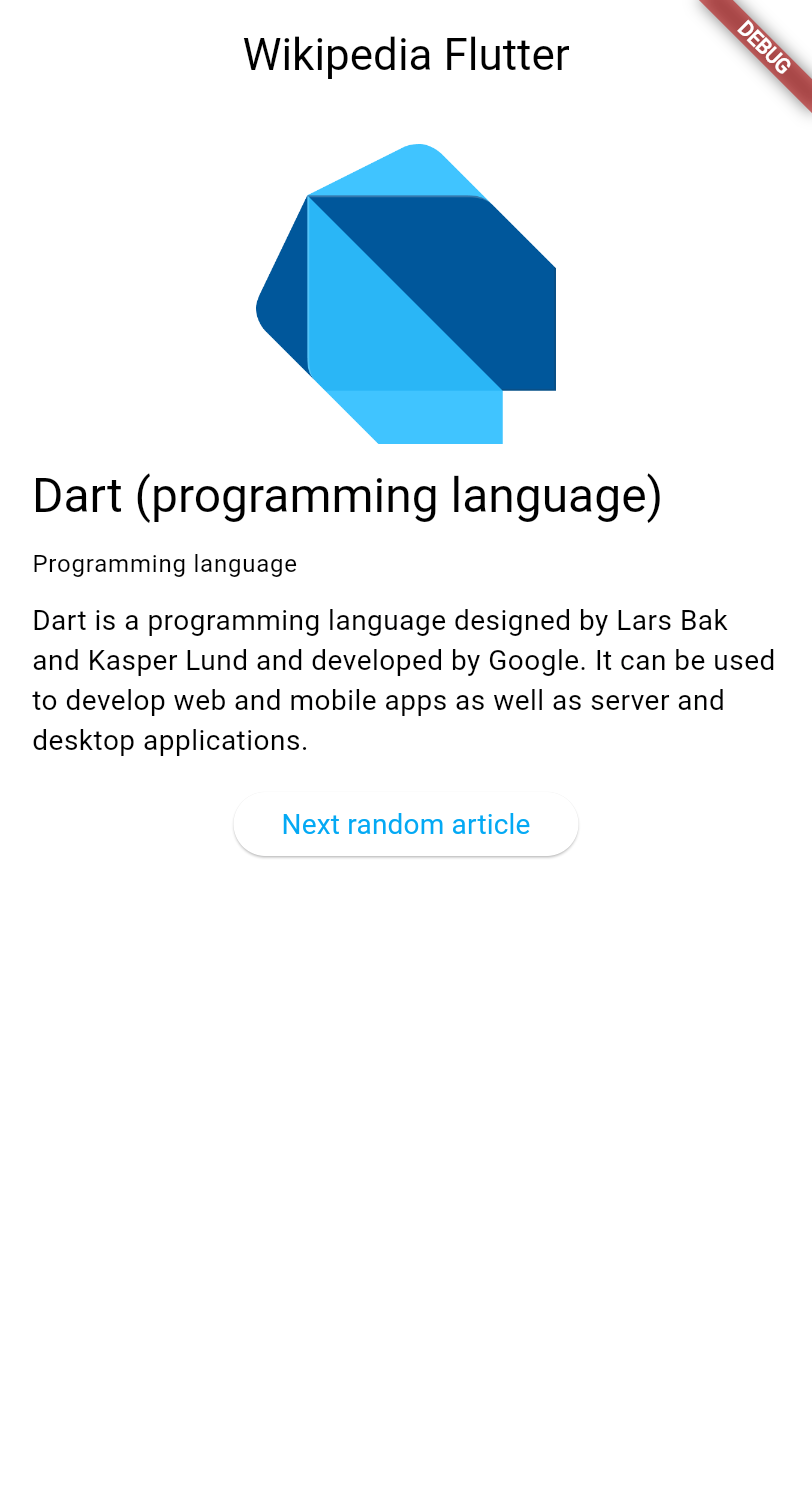
In the next few lessons, you'll learn how to work with data in a Flutter app.
You'll build an app that fetches and displays article summaries from
the [Wikipedia API][].
在接下来的几课中,你将学习如何在 Flutter 应用中处理数据。
你将构建一个从 [Wikipedia API][] 获取并显示文章摘要的应用。
 These lessons explore:
这些课程将探讨:
- Making HTTP requests in Flutter.
在 Flutter 中发起 HTTP 请求。
- Managing application state with `ChangeNotifier`.
使用 `ChangeNotifier` 管理应用状态。
- Using the MVVM architecture pattern.
使用 MVVM 架构模式。
- Creating responsive user interfaces that
update automatically when data changes.
创建在数据变化时自动更新的响应式用户界面。
This tutorial assumes you've completed the
[Getting started with Dart][] and the [Introduction to Flutter UI][] tutorials,
and therefore doesn't explain concepts like HTTP, JSON, or widget basics.
本教程假定你已完成
[Getting started with Dart][] 和 [Introduction to Flutter UI][] 教程,
因此不会解释 HTTP、JSON 或 widget 基础等概念。
:::recommend 支持 Wikipedia
[Wikipedia][] is a valuable resource, providing free
access to human knowledge through millions of articles written
collaboratively by volunteers worldwide.
Consider [donating to Wikipedia][] to help keep this incredible resource
free and accessible to everyone.
[Wikipedia][] 是宝贵资源,通过全球志愿者协作撰写的数百万篇文章
免费提供人类知识。
考虑 [donating to Wikipedia][],帮助保持这一非凡资源
免费且人人可及。
:::
[Wikipedia API]: https://en.wikipedia.org/api/rest_v1/
[Getting started with Dart]: https://dart.cn/learn/tutorial
[Introduction to Flutter UI]: /learn/pathway/tutorial/create-an-app
[Wikipedia]: https://wikipedia.org/
[donating to Wikipedia]: https://donate.wikimedia.org/
### 创建新的 Flutter 项目
Create a new Flutter project using the [Flutter CLI][].
In your preferred terminal, run the following command to
create a minimal Flutter app:
使用 [Flutter CLI][] 创建新的 Flutter 项目。
在你偏好的终端中,运行以下命令以
创建精简的 Flutter 应用:
```console
$ flutter create wikipedia_reader --empty
```
[Flutter CLI]: /reference/flutter-cli
### 添加所需依赖
Your app needs the [`http` package][] to make HTTP requests.
Add it to your project:
你的应用需要 [`http` package][] 来发起 HTTP 请求。
将其添加到你的项目中:
```console
$ cd wikipedia_reader && flutter pub add http
```
[`http` package]: https://pub-web.flutter-io.cn/packages/http
### 查看起始代码
First, create a new file `lib/summary.dart` to define the data model
for Wikipedia article summaries. This file has no special logic, and is
simply a collection of classes that represent the data returned by the
Wikipedia API. It's sufficient to copy the code below into the file and then ignore it.
If you aren't comfortable with basic Dart classes, you should read the [Dart Getting Started][] tutorial first.
首先,创建新文件 `lib/summary.dart` 以定义Wikipedia 文章摘要的数据模型。
该文件没有特殊逻辑,只是表示 Wikipedia API 返回数据的类的集合。
将下面的代码复制到文件中即可,之后可以忽略它。
如果你对基本 Dart 类还不熟悉,应先阅读 [Dart Getting Started][] 教程。
```dart title="lib/summary.dart" collapsed
/// Representation of the JSON data returned by the Wikipedia API.
class Summary {
/// Returns a new [Summary] instance.
Summary({
required this.titles,
required this.pageId,
required this.extract,
required this.extractHtml,
required this.lang,
required this.dir,
required this.url,
this.description,
this.thumbnail,
this.originalImage,
});
/// The title information of this article.
final TitlesSet titles;
/// The page ID of this article.
final int pageId;
/// The first few sentences of the article in plain text.
final String extract;
/// The first few sentences of the article in HTML format.
final String extractHtml;
/// The language code of the article's content, such as "en" for English.
final String lang;
/// The text directionality of the article's content, such as "ltr" or "rtl".
final String dir;
/// The URL of the page.
final String url;
/// A description of the article, if available.
final String? description;
/// A thumbnail-sized version of the article's primary image, if available.
final ImageFile? thumbnail;
/// The original full-sized article's primary image, if available.
final ImageFile? originalImage;
/// Whether this article has an image.
bool get hasImage => originalImage != null && thumbnail != null;
/// Returns a new [Summary] instance and imports its values from a JSON map
static Summary fromJson(Map json) {
return switch (json) {
{
'titles': final Map titles,
'pageid': final int pageId,
'extract': final String extract,
'extract_html': final String extractHtml,
'thumbnail': final Map thumbnail,
'originalimage': final Map originalImage,
'lang': final String lang,
'dir': final String dir,
'description': final String description,
'content_urls': {
'desktop': {'page': final String url},
'mobile': {'page': String _},
},
} =>
Summary(
titles: TitlesSet.fromJson(titles),
pageId: pageId,
extract: extract,
extractHtml: extractHtml,
thumbnail: ImageFile.fromJson(thumbnail),
originalImage: ImageFile.fromJson(originalImage),
lang: lang,
dir: dir,
description: description,
url: url,
),
{
'titles': final Map titles,
'pageid': final int pageId,
'extract': final String extract,
'extract_html': final String extractHtml,
'lang': final String lang,
'dir': final String dir,
'description': final String description,
'content_urls': {
'desktop': {'page': final String url},
'mobile': {'page': String _},
},
} =>
Summary(
titles: TitlesSet.fromJson(titles),
pageId: pageId,
extract: extract,
extractHtml: extractHtml,
lang: lang,
dir: dir,
description: description,
url: url,
),
{
'titles': final Map titles,
'pageid': final int pageId,
'extract': final String extract,
'extract_html': final String extractHtml,
'lang': final String lang,
'dir': final String dir,
'content_urls': {
'desktop': {'page': final String url},
'mobile': {'page': String _},
},
} =>
Summary(
titles: TitlesSet.fromJson(titles),
pageId: pageId,
extract: extract,
extractHtml: extractHtml,
lang: lang,
dir: dir,
url: url,
),
_ => throw FormatException('Could not deserialize Summary, json=$json'),
};
}
@override
String toString() =>
'Summary['
'titles=$titles, '
'pageId=$pageId, '
'extract=$extract, '
'extractHtml=$extractHtml, '
'thumbnail=${thumbnail ?? 'null'}, '
'originalImage=${originalImage ?? 'null'}, '
'lang=$lang, '
'dir=$dir, '
'description=$description'
']';
}
// Image path and size, but doesn't contain any Wikipedia descriptions.
class ImageFile {
/// Returns a new [ImageFile] instance.
ImageFile({required this.source, required this.width, required this.height});
/// The URI of the original image.
final String source;
/// The width of the original image.
final int width;
/// The height of the original image.
final int height;
/// The file extension of the image, or 'err' if one can't be determined.
String get extension {
final extension = getFileExtension(source);
// By default, return a non-viable image extension.
return extension ?? 'err';
}
/// Returns a JSON map representation of this [ImageFile].
Map toJson() {
return {
'source': source,
'width': width,
'height': height,
};
}
/// Returns a new [ImageFile] instance with its values populated from [json].
static ImageFile fromJson(Map json) {
if (json case {
'source': final String source,
'height': final int height,
'width': final int width,
}) {
return ImageFile(source: source, width: width, height: height);
}
throw FormatException('Could not deserialize OriginalImage, json=$json');
}
@override
String toString() =>
'OriginalImage[source_=$source, width=$width, height=$height]';
}
class TitlesSet {
/// Returns a new [TitlesSet] instance.
TitlesSet({
required this.canonical,
required this.normalized,
required this.display,
});
/// The non-prefixed DB key for the article.
///
/// Might contain changes such as underscores instead of spaces.
/// Best suited for making request URIs, but still requires percent-encoding.
final String canonical;
/// The [normalized title](https://www.mediawiki.org/wiki/API:Query#Example_2:_Title_normalization)
/// of the article.
final String normalized;
/// The title as it should be displayed to the user.
final String display;
/// Returns a new [TitlesSet] instance with its values populated from [json].
static TitlesSet fromJson(Map json) {
if (json case {
'canonical': final String canonical,
'normalized': final String normalized,
'display': final String display,
}) {
return TitlesSet(
canonical: canonical,
normalized: normalized,
display: display,
);
}
throw FormatException('Could not deserialize TitleSet, json=$json');
}
@override
String toString() =>
'TitlesSet['
'canonical=$canonical, '
'normalized=$normalized, '
'display=$display'
']';
}
String? getFileExtension(String file) {
final segments = file.split('.');
if (segments.isNotEmpty) return segments.last;
return null;
}
const acceptableImageFormats = ['png', 'jpg', 'jpeg'];
```
Then, open `lib/main.dart` and replace the existing code with
this basic structure, which adds required imports that the app uses:
然后,打开 `lib/main.dart` 并将现有代码替换为此基本结构,
其中添加了应用所需的导入:
```dart title="lib/main.dart"
import 'dart:convert';
import 'dart:io';
import 'package:flutter/material.dart';
import 'package:http/http.dart';
import 'summary.dart';
void main() {
runApp(const MainApp());
}
class MainApp extends StatelessWidget {
const MainApp({super.key});
@override
Widget build(BuildContext context) {
return MaterialApp(
home: Scaffold(
appBar: AppBar(title: const Text('Wikipedia Flutter')),
body: const Center(child: Text('Loading...')),
),
);
}
}
```
This code provides a basic app structure with
a title bar and placeholder content.
The imports at the top include everything you need for
HTTP requests, JSON parsing, and the Wikipedia data model.
此代码提供了带有标题栏和占位内容的基本应用结构。
顶部的导入包含 HTTP 请求、JSON 解析和 Wikipedia 数据模型所需的全部内容。
[Dart Getting Started]: https://dart.cn/tutorial
### 运行应用
Test that everything works by running your app:
通过运行应用测试一切是否正常:
```console
$ flutter run -d chrome
```
You should see a simple app with "Wikipedia Flutter" in the app bar
and "Loading..." in the center of the screen.
你应看到一个简单应用,应用栏显示「Wikipedia Flutter」,
屏幕中央显示「Loading...」。
### 回顾
title: 你完成的内容
subtitle: 以下是你本课构建与学习内容的摘要。
completed: true
items:
- title: 预览了 Wikipedia 阅读器应用
icon: preview
details: >-
你正在开始一个专注于数据处理的新教程章节。
你将学习 HTTP 请求、使用 `ChangeNotifier` 的状态管理,
以及 MVVM 架构模式。
- title: 添加了 http package 并创建了数据模型
icon: inventory_2
details: >-
你使用 `flutter pub add` 安装了用于发起 HTTP 请求的 http package,
并创建了用于 Wikipedia 数据的 `Summary` 类。
package 让你可以利用社区构建的现有代码,
而不必从零开始构建一切。
- title: 设置了初始项目结构
icon: code
details: >-
你的应用已具备基本结构,包含 HTTP 请求、JSON 解析和 Wikipedia 数据所需的全部导入。
你已准备好从 Wikipedia API 获取真实数据!
### 自测
- question: "运行 `flutter create` 时 `--empty` 标志有什么作用?"
options:
- text: 创建一个完全没有文件的项目。
correct: false
explanation: 项目仍包含必要文件;只是使用精简模板。
- text: 创建一个样板代码更少的精简 Flutter 项目。
correct: true
explanation: "`--empty` 标志会生成不含默认计数器应用的精简起始模板。"
- text: 创建一个没有任何依赖的项目。
correct: false
explanation: 项目仍包含核心 Flutter 依赖。
- text: 创建一个只能在 Web 上运行的项目。
correct: false
explanation: 该标志不限制平台;只影响起始模板。
- question: 使用什么命令向 Flutter 项目添加 package 依赖?
options:
- text: "`flutter install [package_name]`"
correct: false
explanation: "正确命令使用 `pub add`,而非 `install`。"
- text: "`flutter pub add [package_name]`"
correct: true
explanation: "运行 `flutter pub add` 会将 package 添加到 pubspec.yaml 并下载。"
- text: "`dart get [package_name]`"
correct: false
explanation: "添加 package 的命令是 `flutter pub add` 或编辑 pubspec.yaml。"
- text: "`flutter package install [package_name]`"
correct: false
explanation: "没有 `flutter package` 命令;请使用 `flutter pub add`。"
These lessons explore:
这些课程将探讨:
- Making HTTP requests in Flutter.
在 Flutter 中发起 HTTP 请求。
- Managing application state with `ChangeNotifier`.
使用 `ChangeNotifier` 管理应用状态。
- Using the MVVM architecture pattern.
使用 MVVM 架构模式。
- Creating responsive user interfaces that
update automatically when data changes.
创建在数据变化时自动更新的响应式用户界面。
This tutorial assumes you've completed the
[Getting started with Dart][] and the [Introduction to Flutter UI][] tutorials,
and therefore doesn't explain concepts like HTTP, JSON, or widget basics.
本教程假定你已完成
[Getting started with Dart][] 和 [Introduction to Flutter UI][] 教程,
因此不会解释 HTTP、JSON 或 widget 基础等概念。
:::recommend 支持 Wikipedia
[Wikipedia][] is a valuable resource, providing free
access to human knowledge through millions of articles written
collaboratively by volunteers worldwide.
Consider [donating to Wikipedia][] to help keep this incredible resource
free and accessible to everyone.
[Wikipedia][] 是宝贵资源,通过全球志愿者协作撰写的数百万篇文章
免费提供人类知识。
考虑 [donating to Wikipedia][],帮助保持这一非凡资源
免费且人人可及。
:::
[Wikipedia API]: https://en.wikipedia.org/api/rest_v1/
[Getting started with Dart]: https://dart.cn/learn/tutorial
[Introduction to Flutter UI]: /learn/pathway/tutorial/create-an-app
[Wikipedia]: https://wikipedia.org/
[donating to Wikipedia]: https://donate.wikimedia.org/
### 创建新的 Flutter 项目
Create a new Flutter project using the [Flutter CLI][].
In your preferred terminal, run the following command to
create a minimal Flutter app:
使用 [Flutter CLI][] 创建新的 Flutter 项目。
在你偏好的终端中,运行以下命令以
创建精简的 Flutter 应用:
```console
$ flutter create wikipedia_reader --empty
```
[Flutter CLI]: /reference/flutter-cli
### 添加所需依赖
Your app needs the [`http` package][] to make HTTP requests.
Add it to your project:
你的应用需要 [`http` package][] 来发起 HTTP 请求。
将其添加到你的项目中:
```console
$ cd wikipedia_reader && flutter pub add http
```
[`http` package]: https://pub-web.flutter-io.cn/packages/http
### 查看起始代码
First, create a new file `lib/summary.dart` to define the data model
for Wikipedia article summaries. This file has no special logic, and is
simply a collection of classes that represent the data returned by the
Wikipedia API. It's sufficient to copy the code below into the file and then ignore it.
If you aren't comfortable with basic Dart classes, you should read the [Dart Getting Started][] tutorial first.
首先,创建新文件 `lib/summary.dart` 以定义Wikipedia 文章摘要的数据模型。
该文件没有特殊逻辑,只是表示 Wikipedia API 返回数据的类的集合。
将下面的代码复制到文件中即可,之后可以忽略它。
如果你对基本 Dart 类还不熟悉,应先阅读 [Dart Getting Started][] 教程。
```dart title="lib/summary.dart" collapsed
/// Representation of the JSON data returned by the Wikipedia API.
class Summary {
/// Returns a new [Summary] instance.
Summary({
required this.titles,
required this.pageId,
required this.extract,
required this.extractHtml,
required this.lang,
required this.dir,
required this.url,
this.description,
this.thumbnail,
this.originalImage,
});
/// The title information of this article.
final TitlesSet titles;
/// The page ID of this article.
final int pageId;
/// The first few sentences of the article in plain text.
final String extract;
/// The first few sentences of the article in HTML format.
final String extractHtml;
/// The language code of the article's content, such as "en" for English.
final String lang;
/// The text directionality of the article's content, such as "ltr" or "rtl".
final String dir;
/// The URL of the page.
final String url;
/// A description of the article, if available.
final String? description;
/// A thumbnail-sized version of the article's primary image, if available.
final ImageFile? thumbnail;
/// The original full-sized article's primary image, if available.
final ImageFile? originalImage;
/// Whether this article has an image.
bool get hasImage => originalImage != null && thumbnail != null;
/// Returns a new [Summary] instance and imports its values from a JSON map
static Summary fromJson(Map json) {
return switch (json) {
{
'titles': final Map titles,
'pageid': final int pageId,
'extract': final String extract,
'extract_html': final String extractHtml,
'thumbnail': final Map thumbnail,
'originalimage': final Map originalImage,
'lang': final String lang,
'dir': final String dir,
'description': final String description,
'content_urls': {
'desktop': {'page': final String url},
'mobile': {'page': String _},
},
} =>
Summary(
titles: TitlesSet.fromJson(titles),
pageId: pageId,
extract: extract,
extractHtml: extractHtml,
thumbnail: ImageFile.fromJson(thumbnail),
originalImage: ImageFile.fromJson(originalImage),
lang: lang,
dir: dir,
description: description,
url: url,
),
{
'titles': final Map titles,
'pageid': final int pageId,
'extract': final String extract,
'extract_html': final String extractHtml,
'lang': final String lang,
'dir': final String dir,
'description': final String description,
'content_urls': {
'desktop': {'page': final String url},
'mobile': {'page': String _},
},
} =>
Summary(
titles: TitlesSet.fromJson(titles),
pageId: pageId,
extract: extract,
extractHtml: extractHtml,
lang: lang,
dir: dir,
description: description,
url: url,
),
{
'titles': final Map titles,
'pageid': final int pageId,
'extract': final String extract,
'extract_html': final String extractHtml,
'lang': final String lang,
'dir': final String dir,
'content_urls': {
'desktop': {'page': final String url},
'mobile': {'page': String _},
},
} =>
Summary(
titles: TitlesSet.fromJson(titles),
pageId: pageId,
extract: extract,
extractHtml: extractHtml,
lang: lang,
dir: dir,
url: url,
),
_ => throw FormatException('Could not deserialize Summary, json=$json'),
};
}
@override
String toString() =>
'Summary['
'titles=$titles, '
'pageId=$pageId, '
'extract=$extract, '
'extractHtml=$extractHtml, '
'thumbnail=${thumbnail ?? 'null'}, '
'originalImage=${originalImage ?? 'null'}, '
'lang=$lang, '
'dir=$dir, '
'description=$description'
']';
}
// Image path and size, but doesn't contain any Wikipedia descriptions.
class ImageFile {
/// Returns a new [ImageFile] instance.
ImageFile({required this.source, required this.width, required this.height});
/// The URI of the original image.
final String source;
/// The width of the original image.
final int width;
/// The height of the original image.
final int height;
/// The file extension of the image, or 'err' if one can't be determined.
String get extension {
final extension = getFileExtension(source);
// By default, return a non-viable image extension.
return extension ?? 'err';
}
/// Returns a JSON map representation of this [ImageFile].
Map toJson() {
return {
'source': source,
'width': width,
'height': height,
};
}
/// Returns a new [ImageFile] instance with its values populated from [json].
static ImageFile fromJson(Map json) {
if (json case {
'source': final String source,
'height': final int height,
'width': final int width,
}) {
return ImageFile(source: source, width: width, height: height);
}
throw FormatException('Could not deserialize OriginalImage, json=$json');
}
@override
String toString() =>
'OriginalImage[source_=$source, width=$width, height=$height]';
}
class TitlesSet {
/// Returns a new [TitlesSet] instance.
TitlesSet({
required this.canonical,
required this.normalized,
required this.display,
});
/// The non-prefixed DB key for the article.
///
/// Might contain changes such as underscores instead of spaces.
/// Best suited for making request URIs, but still requires percent-encoding.
final String canonical;
/// The [normalized title](https://www.mediawiki.org/wiki/API:Query#Example_2:_Title_normalization)
/// of the article.
final String normalized;
/// The title as it should be displayed to the user.
final String display;
/// Returns a new [TitlesSet] instance with its values populated from [json].
static TitlesSet fromJson(Map json) {
if (json case {
'canonical': final String canonical,
'normalized': final String normalized,
'display': final String display,
}) {
return TitlesSet(
canonical: canonical,
normalized: normalized,
display: display,
);
}
throw FormatException('Could not deserialize TitleSet, json=$json');
}
@override
String toString() =>
'TitlesSet['
'canonical=$canonical, '
'normalized=$normalized, '
'display=$display'
']';
}
String? getFileExtension(String file) {
final segments = file.split('.');
if (segments.isNotEmpty) return segments.last;
return null;
}
const acceptableImageFormats = ['png', 'jpg', 'jpeg'];
```
Then, open `lib/main.dart` and replace the existing code with
this basic structure, which adds required imports that the app uses:
然后,打开 `lib/main.dart` 并将现有代码替换为此基本结构,
其中添加了应用所需的导入:
```dart title="lib/main.dart"
import 'dart:convert';
import 'dart:io';
import 'package:flutter/material.dart';
import 'package:http/http.dart';
import 'summary.dart';
void main() {
runApp(const MainApp());
}
class MainApp extends StatelessWidget {
const MainApp({super.key});
@override
Widget build(BuildContext context) {
return MaterialApp(
home: Scaffold(
appBar: AppBar(title: const Text('Wikipedia Flutter')),
body: const Center(child: Text('Loading...')),
),
);
}
}
```
This code provides a basic app structure with
a title bar and placeholder content.
The imports at the top include everything you need for
HTTP requests, JSON parsing, and the Wikipedia data model.
此代码提供了带有标题栏和占位内容的基本应用结构。
顶部的导入包含 HTTP 请求、JSON 解析和 Wikipedia 数据模型所需的全部内容。
[Dart Getting Started]: https://dart.cn/tutorial
### 运行应用
Test that everything works by running your app:
通过运行应用测试一切是否正常:
```console
$ flutter run -d chrome
```
You should see a simple app with "Wikipedia Flutter" in the app bar
and "Loading..." in the center of the screen.
你应看到一个简单应用,应用栏显示「Wikipedia Flutter」,
屏幕中央显示「Loading...」。
### 回顾
title: 你完成的内容
subtitle: 以下是你本课构建与学习内容的摘要。
completed: true
items:
- title: 预览了 Wikipedia 阅读器应用
icon: preview
details: >-
你正在开始一个专注于数据处理的新教程章节。
你将学习 HTTP 请求、使用 `ChangeNotifier` 的状态管理,
以及 MVVM 架构模式。
- title: 添加了 http package 并创建了数据模型
icon: inventory_2
details: >-
你使用 `flutter pub add` 安装了用于发起 HTTP 请求的 http package,
并创建了用于 Wikipedia 数据的 `Summary` 类。
package 让你可以利用社区构建的现有代码,
而不必从零开始构建一切。
- title: 设置了初始项目结构
icon: code
details: >-
你的应用已具备基本结构,包含 HTTP 请求、JSON 解析和 Wikipedia 数据所需的全部导入。
你已准备好从 Wikipedia API 获取真实数据!
### 自测
- question: "运行 `flutter create` 时 `--empty` 标志有什么作用?"
options:
- text: 创建一个完全没有文件的项目。
correct: false
explanation: 项目仍包含必要文件;只是使用精简模板。
- text: 创建一个样板代码更少的精简 Flutter 项目。
correct: true
explanation: "`--empty` 标志会生成不含默认计数器应用的精简起始模板。"
- text: 创建一个没有任何依赖的项目。
correct: false
explanation: 项目仍包含核心 Flutter 依赖。
- text: 创建一个只能在 Web 上运行的项目。
correct: false
explanation: 该标志不限制平台;只影响起始模板。
- question: 使用什么命令向 Flutter 项目添加 package 依赖?
options:
- text: "`flutter install [package_name]`"
correct: false
explanation: "正确命令使用 `pub add`,而非 `install`。"
- text: "`flutter pub add [package_name]`"
correct: true
explanation: "运行 `flutter pub add` 会将 package 添加到 pubspec.yaml 并下载。"
- text: "`dart get [package_name]`"
correct: false
explanation: "添加 package 的命令是 `flutter pub add` 或编辑 pubspec.yaml。"
- text: "`flutter package install [package_name]`"
correct: false
explanation: "没有 `flutter package` 命令;请使用 `flutter pub add`。"