# 有状态 widget
> 了解 StatefulWidget 以及 Flutter UI 的重建。
Learn when widgets need to be stateful and how to trigger UI updates with setState.
了解 widget 何时需要是有状态的,以及如何使用 setState 触发 UI 更新。
title: 你将完成的内容
items:
- title: 了解 widget 何时需要是有状态的
icon: change_circle
- title: 将 StatelessWidget 转换为 StatefulWidget
icon: swap_horiz
- title: 使用 setState 触发 UI 更新
icon: refresh
---
### 介绍
So far, your app displays a grid and an input field,
but the grid doesn't yet update to reflect the user's guesses.
When this app is complete, each tile in the next unfilled row should
update after each submitted user guess by:
到目前为止,你的应用会显示网格和输入框,
但网格尚未根据用户的猜测进行更新。
当应用完成时,下一未填满行中的每个方块应在
每次提交用户猜测后按以下方式更新:
- Displaying the correct letter.
显示正确的字母。
- Changing color to reflect whether the letter is correct (green),
is in the word but at an incorrect position (yellow), or
doesn't appear in the word at all (grey).
更改颜色以反映字母是否正确(绿色)、
是否在单词中但位置不正确(黄色),或
是否完全不在单词中(灰色)。
To handle this dynamic behavior, you need to convert `GamePage` from a
`StatelessWidget` to a [`StatefulWidget`][].
要处理这种动态行为,你需要将 `GamePage` 从
`StatelessWidget` 转换为 [`StatefulWidget`][]。
[`StatefulWidget`]: https://api.flutter-io.cn/flutter/widgets/StatefulWidget-class.html
### 为什么需要 stateful widget?
When a widget's appearance or data needs to change during its lifetime,
you need a `StatefulWidget` and a companion `State` object.
While the `StatefulWidget` itself is still immutable (its properties
can't change after creation), the `State` object is long-lived,
can hold mutable data, and can be rebuilt when that data changes,
causing the UI to update.
当 widget 的外观或数据在其生命周期内需要变化时,
你需要 `StatefulWidget` 以及配套的 `State` 对象。
虽然 `StatefulWidget` 本身仍不可变
(其属性在创建后无法更改),
但 `State` 对象是长期存在的,
可以保存可变数据,并在数据变化时重建,
从而更新 UI。
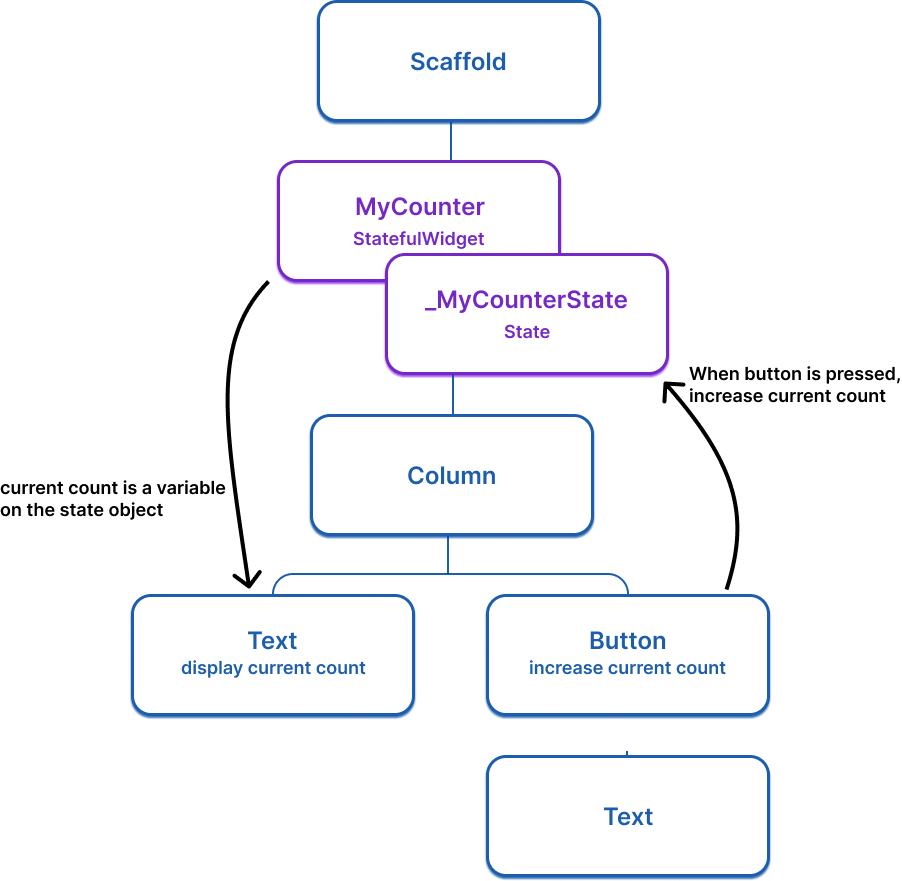
For example, the following widget tree imagines a simple app
that uses a stateful widget with a counter that
increases when the button is pressed.
例如,下面的 widget 树展示了一个简单应用,
它使用带有计数器的有状态 widget,按下按钮时计数器会增加。
 Here is the basic `StatefulWidget` structure (doesn't do anything yet):
以下是基本的 `StatefulWidget` 结构(目前尚无任何功能):
```dart
class ExampleWidget extends StatefulWidget {
ExampleWidget({super.key});
@override
State createState() => _ExampleWidgetState();
}
class _ExampleWidgetState extends State {
@override
Widget build(BuildContext context) {
return Container();
}
}
```
### 将 `GamePage` 转换为有状态 widget
To convert the `GamePage` (or any other) widget from
a stateless widget to a stateful widget, do the following steps:
要将 `GamePage`(或任何其他)widget 从无状态 widget 转换为有状态 widget,
请执行以下步骤:
1. Change `GamePage` to extend `StatefulWidget` instead of `StatelessWidget`.
将 `GamePage` 改为继承 `StatefulWidget`,而不是 `StatelessWidget`。
1. Create a new class named `_GamePageState`, that extends `State`.
This new class will hold the mutable state and the `build` method.
Move the `build` method and all properties *instantiated on the widget*
from `GamePage` to the state object.
创建一个名为 `_GamePageState` 的新类,继承 `State`。
这个新类将保存可变状态以及 `build` 方法。
将 `build` 方法以及所有在 widget 上 **实例化的属性**
从 `GamePage` 移到 state 对象中。
1. Implement the `createState()` method in `GamePage`, which
returns an instance of `_GamePageState`.
在 `GamePage` 中实现 `createState()` 方法,
该方法返回 `_GamePageState` 的实例。
:::tip 快速操作
You don't have to manually do this work, as the Flutter plugins for
VS Code and IntelliJ provide ["quick assists"][] that can
do this conversion for you.
你不必手动完成这些工作,因为适用于 VS Code 和 IntelliJ 的
Flutter 插件提供了可以为你完成此转换的 [快速操作]["quick assists"]。
:::
Your modified code should look like this:
修改后的代码应如下所示:
```dart
class GamePage extends StatefulWidget {
GamePage({super.key});
@override
State createState() => _GamePageState();
}
class _GamePageState extends State {
final Game _game = Game();
@override
Widget build(BuildContext context) {
return Padding(
padding: const EdgeInsets.all(8.0),
child: Column(
children: [
for (var guess in _game.guesses)
Row(
mainAxisAlignment: MainAxisAlignment.center,
children: [
for (var letter in guess)
Padding(
padding: const EdgeInsets.symmetric(horizontal: 2.5, vertical: 2.5),
child: Tile(letter.char, letter.type),
)
],
),
GuessInput(
onSubmitGuess: (_) {
// TODO, handle guess
print(guess); // Temporary
},
),
],
),
);
}
}
```
["quick assists"]: /tools/android-studio#assists-quick-fixes
### 使用 `setState` 更新 UI
Whenever you mutate a `State` object,
you must call [`setState`][] to signal the framework to
update the user interface and call the `build` method again.
每当你修改 `State` 对象时,
必须调用 [`setState`][] 以通知框架更新用户界面并再次调用 `build` 方法。
In this app, when a user makes a guess, the word they guessed is
saved on the `Game` object, which is a property on the `GamePage` class,
and therefore is state that might change and require the UI to update.
When this state is mutated, the grid should be
re-drawn to show the user's guess.
在本应用中,当用户进行猜测时,
他们猜的单词会保存在 `Game` 对象上,
它是 `GamePage` 类的一个属性,
因此属于可能变化并需要 UI 更新的状态。
当此状态被修改时,应重新绘制网格以显示用户的猜测。
To implement this, update the callback function passed to `GuessInput`.
The function needs to call `setState` and, within `setState`,
it needs to execute the logic to determine whether the users guess was correct.
要实现这一点,请更新传给 `GuessInput` 的回调函数。
该函数需要调用 `setState`,
并在 `setState` 内部执行用于判断用户猜测是否正确的逻辑。
:::note
The game logic is abstracted away into the `Game` object,
and outside the scope of this tutorial.
游戏逻辑已抽象到 `Game` 对象中,
不在本教程范围内。
:::
Update your code:
更新你的代码:
```dart
class GamePage extends StatefulWidget {
GamePage({super.key});
@override
State createState() => _GamePageState();
}
class _GamePageState extends State {
final Game _game = Game();
@override
Widget build(BuildContext context) {
return Padding(
padding: const EdgeInsets.all(8.0),
child: Column(
children: [
for (var guess in _game.guesses)
Row(
mainAxisAlignment: MainAxisAlignment.center,
children: [
for (var letter in guess)
Padding(
padding: const EdgeInsets.symmetric(horizontal: 2.5, vertical: 2.5),
child: Tile(letter.char, letter.type),
)
],
),
GuessInput(
onSubmitGuess: (String guess) {
setState(() { // NEW
_game.guess(guess);
});
},
),
],
),
);
}
}
```
Now, when you type a legal guess into the `TextInput` and submit it,
the application will reflect the user's guess.
If you were to call `_game.guess(guess)` *without* a calling `setState`,
the internal game data would change, but Flutter wouldn't know it
needs to repaint the screen, and the user wouldn't see any updates.
现在,当你在 `TextInput` 中输入合法猜测并提交时,
应用会反映用户的猜测。
如果你 **不** 调用 `setState` 就调用 `_game.guess(guess)`,
内部游戏数据会变化,但 Flutter 不会知道需要重绘屏幕,
用户也就看不到任何更新。
[`setState`]: https://api.flutter-io.cn/flutter/widgets/State/setState.html
### 回顾
title: 你完成的内容
subtitle: 以下是你本课构建与学习内容的摘要。
completed: true
items:
- title: 了解了 widget 何时需要是有状态的
icon: change_circle
details: >-
当 widget 的外观或数据在其生命周期内需要变化时,
你需要 `StatefulWidget`。widget 本身保持不可变,但
其配套的 `State` 对象保存可变数据并触发重建。
- title: 将 GamePage 转换为 StatefulWidget
icon: swap_horiz
details: >-
你通过创建配套的 `_GamePageState` 类、将
`build` 方法和可变属性移到该类中,并
实现 `createState()`,将 `GamePage` 重构为有状态 widget。
IDE 对快速操作的支持可以自动完成此转换。
- title: 使用 setState 让应用响应用户输入
icon: refresh
details: >-
调用 `setState` 会告诉 Flutter 重建 widget 的 UI。
当用户提交猜测时,你调用 `setState` 更新游戏状态,
网格会自动反映新数据。
你的应用现在真正具有交互性了!
### 自测
- question: 何时应使用 StatefulWidget 而不是 StatelessWidget?
options:
- text: 当 widget 需要发起 HTTP 请求时。
correct: false
explanation: 两者都可以发起 HTTP 请求,但状态变化需要 StatefulWidget。
- text: 当 widget 的外观或数据在其生命周期内需要变化时。
correct: true
explanation: 当 UI 必须随时间响应数据变化而更新时,需要 StatefulWidget。
- text: 当 widget 有超过三个子 widget 时。
correct: false
explanation: 子 widget 的数量不决定 widget 是否为有状态 widget。
- text: 当 widget 位于 widget 树根节点时。
correct: false
explanation: 根 widget 可以是无状态的;是否有状态取决于数据是否在 widget 生命周期内变化。
- question: 如果在不调用 setState 的情况下修改 State 对象中的数据会发生什么?
options:
- text: 应用会因错误而崩溃。
correct: false
explanation: 应用不会崩溃,但 UI 不会更新。
- text: 数据在内部会变化,但 Flutter 不会重建 UI 以反映该变化。
correct: true
explanation: 若不调用 setState,Flutter 不知道需要重绘,用户也就看不到更新。
- text: Flutter 会自动检测变化并重建 UI。
correct: false
explanation: Flutter 需要 setState 才能知道何时重建;它不会自动检测变化。
- text: widget 会从 widget 树中移除。
correct: false
explanation: widget 仍然存在;只是没有 setState 时不会在视觉上更新。
Here is the basic `StatefulWidget` structure (doesn't do anything yet):
以下是基本的 `StatefulWidget` 结构(目前尚无任何功能):
```dart
class ExampleWidget extends StatefulWidget {
ExampleWidget({super.key});
@override
State createState() => _ExampleWidgetState();
}
class _ExampleWidgetState extends State {
@override
Widget build(BuildContext context) {
return Container();
}
}
```
### 将 `GamePage` 转换为有状态 widget
To convert the `GamePage` (or any other) widget from
a stateless widget to a stateful widget, do the following steps:
要将 `GamePage`(或任何其他)widget 从无状态 widget 转换为有状态 widget,
请执行以下步骤:
1. Change `GamePage` to extend `StatefulWidget` instead of `StatelessWidget`.
将 `GamePage` 改为继承 `StatefulWidget`,而不是 `StatelessWidget`。
1. Create a new class named `_GamePageState`, that extends `State`.
This new class will hold the mutable state and the `build` method.
Move the `build` method and all properties *instantiated on the widget*
from `GamePage` to the state object.
创建一个名为 `_GamePageState` 的新类,继承 `State`。
这个新类将保存可变状态以及 `build` 方法。
将 `build` 方法以及所有在 widget 上 **实例化的属性**
从 `GamePage` 移到 state 对象中。
1. Implement the `createState()` method in `GamePage`, which
returns an instance of `_GamePageState`.
在 `GamePage` 中实现 `createState()` 方法,
该方法返回 `_GamePageState` 的实例。
:::tip 快速操作
You don't have to manually do this work, as the Flutter plugins for
VS Code and IntelliJ provide ["quick assists"][] that can
do this conversion for you.
你不必手动完成这些工作,因为适用于 VS Code 和 IntelliJ 的
Flutter 插件提供了可以为你完成此转换的 [快速操作]["quick assists"]。
:::
Your modified code should look like this:
修改后的代码应如下所示:
```dart
class GamePage extends StatefulWidget {
GamePage({super.key});
@override
State createState() => _GamePageState();
}
class _GamePageState extends State {
final Game _game = Game();
@override
Widget build(BuildContext context) {
return Padding(
padding: const EdgeInsets.all(8.0),
child: Column(
children: [
for (var guess in _game.guesses)
Row(
mainAxisAlignment: MainAxisAlignment.center,
children: [
for (var letter in guess)
Padding(
padding: const EdgeInsets.symmetric(horizontal: 2.5, vertical: 2.5),
child: Tile(letter.char, letter.type),
)
],
),
GuessInput(
onSubmitGuess: (_) {
// TODO, handle guess
print(guess); // Temporary
},
),
],
),
);
}
}
```
["quick assists"]: /tools/android-studio#assists-quick-fixes
### 使用 `setState` 更新 UI
Whenever you mutate a `State` object,
you must call [`setState`][] to signal the framework to
update the user interface and call the `build` method again.
每当你修改 `State` 对象时,
必须调用 [`setState`][] 以通知框架更新用户界面并再次调用 `build` 方法。
In this app, when a user makes a guess, the word they guessed is
saved on the `Game` object, which is a property on the `GamePage` class,
and therefore is state that might change and require the UI to update.
When this state is mutated, the grid should be
re-drawn to show the user's guess.
在本应用中,当用户进行猜测时,
他们猜的单词会保存在 `Game` 对象上,
它是 `GamePage` 类的一个属性,
因此属于可能变化并需要 UI 更新的状态。
当此状态被修改时,应重新绘制网格以显示用户的猜测。
To implement this, update the callback function passed to `GuessInput`.
The function needs to call `setState` and, within `setState`,
it needs to execute the logic to determine whether the users guess was correct.
要实现这一点,请更新传给 `GuessInput` 的回调函数。
该函数需要调用 `setState`,
并在 `setState` 内部执行用于判断用户猜测是否正确的逻辑。
:::note
The game logic is abstracted away into the `Game` object,
and outside the scope of this tutorial.
游戏逻辑已抽象到 `Game` 对象中,
不在本教程范围内。
:::
Update your code:
更新你的代码:
```dart
class GamePage extends StatefulWidget {
GamePage({super.key});
@override
State createState() => _GamePageState();
}
class _GamePageState extends State {
final Game _game = Game();
@override
Widget build(BuildContext context) {
return Padding(
padding: const EdgeInsets.all(8.0),
child: Column(
children: [
for (var guess in _game.guesses)
Row(
mainAxisAlignment: MainAxisAlignment.center,
children: [
for (var letter in guess)
Padding(
padding: const EdgeInsets.symmetric(horizontal: 2.5, vertical: 2.5),
child: Tile(letter.char, letter.type),
)
],
),
GuessInput(
onSubmitGuess: (String guess) {
setState(() { // NEW
_game.guess(guess);
});
},
),
],
),
);
}
}
```
Now, when you type a legal guess into the `TextInput` and submit it,
the application will reflect the user's guess.
If you were to call `_game.guess(guess)` *without* a calling `setState`,
the internal game data would change, but Flutter wouldn't know it
needs to repaint the screen, and the user wouldn't see any updates.
现在,当你在 `TextInput` 中输入合法猜测并提交时,
应用会反映用户的猜测。
如果你 **不** 调用 `setState` 就调用 `_game.guess(guess)`,
内部游戏数据会变化,但 Flutter 不会知道需要重绘屏幕,
用户也就看不到任何更新。
[`setState`]: https://api.flutter-io.cn/flutter/widgets/State/setState.html
### 回顾
title: 你完成的内容
subtitle: 以下是你本课构建与学习内容的摘要。
completed: true
items:
- title: 了解了 widget 何时需要是有状态的
icon: change_circle
details: >-
当 widget 的外观或数据在其生命周期内需要变化时,
你需要 `StatefulWidget`。widget 本身保持不可变,但
其配套的 `State` 对象保存可变数据并触发重建。
- title: 将 GamePage 转换为 StatefulWidget
icon: swap_horiz
details: >-
你通过创建配套的 `_GamePageState` 类、将
`build` 方法和可变属性移到该类中,并
实现 `createState()`,将 `GamePage` 重构为有状态 widget。
IDE 对快速操作的支持可以自动完成此转换。
- title: 使用 setState 让应用响应用户输入
icon: refresh
details: >-
调用 `setState` 会告诉 Flutter 重建 widget 的 UI。
当用户提交猜测时,你调用 `setState` 更新游戏状态,
网格会自动反映新数据。
你的应用现在真正具有交互性了!
### 自测
- question: 何时应使用 StatefulWidget 而不是 StatelessWidget?
options:
- text: 当 widget 需要发起 HTTP 请求时。
correct: false
explanation: 两者都可以发起 HTTP 请求,但状态变化需要 StatefulWidget。
- text: 当 widget 的外观或数据在其生命周期内需要变化时。
correct: true
explanation: 当 UI 必须随时间响应数据变化而更新时,需要 StatefulWidget。
- text: 当 widget 有超过三个子 widget 时。
correct: false
explanation: 子 widget 的数量不决定 widget 是否为有状态 widget。
- text: 当 widget 位于 widget 树根节点时。
correct: false
explanation: 根 widget 可以是无状态的;是否有状态取决于数据是否在 widget 生命周期内变化。
- question: 如果在不调用 setState 的情况下修改 State 对象中的数据会发生什么?
options:
- text: 应用会因错误而崩溃。
correct: false
explanation: 应用不会崩溃,但 UI 不会更新。
- text: 数据在内部会变化,但 Flutter 不会重建 UI 以反映该变化。
correct: true
explanation: 若不调用 setState,Flutter 不知道需要重绘,用户也就看不到更新。
- text: Flutter 会自动检测变化并重建 UI。
correct: false
explanation: Flutter 需要 setState 才能知道何时重建;它不会自动检测变化。
- text: widget 会从 widget 树中移除。
correct: false
explanation: widget 仍然存在;只是没有 setState 时不会在视觉上更新。