# Flutter 正式支持 Web 平台
> 有关 Flutter 如何支持创建 Web 体验的详细信息。
Flutter delivers the same experiences on the web as on mobile.
Flutter 的 Web 端支持在 Web 和移动设备上提供相同的体验。
Building on the portability of Dart, the power of the web platform,
the flexibility of the Flutter framework, and the performance of WebAssembly,
you can build apps for iOS, Android, and the browser from the same codebase.
The web is just another device target for your app.
基于 Dart 的可移植性、Web 平台的强大、Flutter 框架的灵活性,
以及 WebAssembly 的高性能,
你可以通过同一套代码为 iOS、Android 和浏览器构建应用。
对于你的应用来说,Web 只是另一个目标设备。
To get started, visit [Building a web application with Flutter][].
请访问 [构建 Flutter Web 应用][Building a web application with Flutter],开始学习。
## Powered by WebAssembly
## WebAssembly 支持
Dart and Flutter can compile to WebAssembly,
a binary instruction format that enables fast apps on all major browsers.
Dart 和 Flutter 可以编译为 WebAssembly,
这是一种二进制指令格式,可以在所有主流浏览器上快速运行应用。
For a glimpse into the benefits of using WebAssembly,
check out the following video.
请观看以下视频,来了解使用 WebAssembly 的好处。
## How it works
## 工作原理
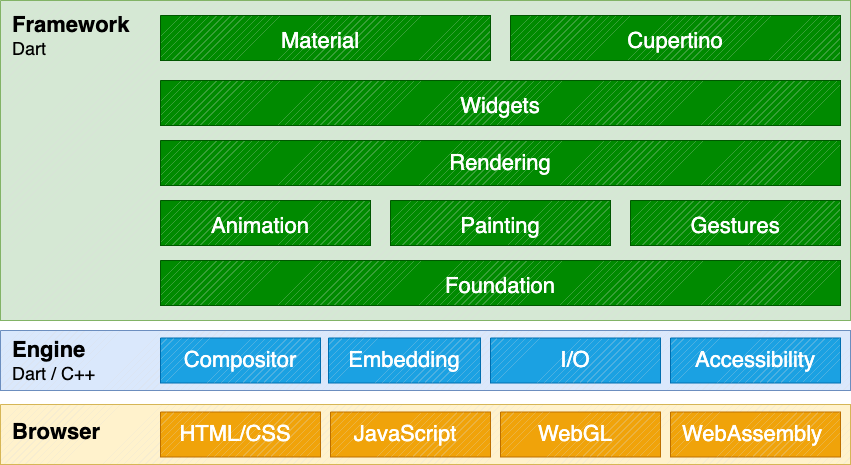
Adding web support to Flutter involved implementing Flutter's
core drawing layer on top of standard browser APIs,
in addition to compiling Dart to JavaScript,
instead of the ARM machine code that
is used for mobile applications.
Using a combination of DOM, Canvas, and WebAssembly,
Flutter can provide a portable, high-quality,
and performant user experience across modern browsers.
We implemented the core drawing layer completely in Dart
and used Dart's optimized JavaScript compiler to compile the
Flutter core and framework along with your application into a single,
minified source file that can be deployed to any web server.
向 Flutter 添加 Web 支持的过程,
涉及在标准浏览器 API 之上实现 Flutter 的核心绘图层,
并将 Dart 编译为 JavaScript,而非移动端应用所使用的 ARM 机器码。
通过结合使用 DOM、Canvas 和 WebAssembly,
Flutter 能够在现代浏览器中提供便携、高质量且高性能的用户体验。
我们完全使用 Dart 实现了核心绘图层,
并利用 Dart 优化过的 JavaScript 编译器,
将 Flutter 的核心、框架以及你的应用编译为一个单一且简化的源文件。
可以部署到任何 Web 服务器上。
 ## What types of apps can I build?
## 我能构建哪种类型的应用?
While you can do a lot on the web,
Flutter's web support is most valuable in the
following scenarios:
尽管你可以在 Web 上做很多事情,
但 Flutter 的 Web 在以下场景最具价值:
**Single Page Application**
## What types of apps can I build?
## 我能构建哪种类型的应用?
While you can do a lot on the web,
Flutter's web support is most valuable in the
following scenarios:
尽管你可以在 Web 上做很多事情,
但 Flutter 的 Web 在以下场景最具价值:
**Single Page Application**
Flutter's web support enables complex standalone web apps that are rich with
graphics and interactive content to reach end users on a wide variety of
devices.
**单页应用**
Flutter Web 可让功能复杂的独立 Web 应用在各种设备上向终端用户
提供富含图形以及交互式的内容。
**Existing mobile applications**
Web support for Flutter provides a browser-based delivery model for existing
Flutter mobile apps.
**现有的移动端应用**
Flutter Web 可以为现有的 Flutter 移动端应用提供基于浏览器的运行方式。
Not every HTML scenario is ideally suited for Flutter at this time.
For example, text-rich, flow-based, static content such as blog articles
benefit from the document-centric model that the web is built around,
rather than the app-centric services that a UI framework like Flutter
can deliver. However, you _can_ use Flutter to embed interactive
experiences into these websites.
目前,并非所有 HTML 场景都适合 Flutter。
例如,像博客文章这样的富文本、流式布局、静态内容,
更适合 Web 本身基于结构化文档内容 (document-centric) 的运行方式,
而非像 Flutter 这样的 UI 框架所提供的专注于应用交互界面服务 (app-centric) 的运行方式,
不过,你仍然 **可以** 使用 Flutter 将交互式体验嵌入到这些网站中。
However, if you want to use Dart and wish to implement a traditional
DOM-based website, a community-released Dart package,
[Jaspr][], supports static websites; in fact,
the [Dart documentation][] and [Flutter documentation][]
and [marketing][] websites were migrated to use the Jaspr package.
Note that Jaspr uses Dart (but not Flutter), and makes SEO work in the same
way a traditional website would.
然而,如果你想使用 Dart 并希望实现一个基于 DOM 的传统网站,
你可以使用 [Jaspr][](由社区发布的 Dart package)来支持静态网站。
实际上,[Dart 文档][Dart documentation]、[Flutter 文档][Flutter documentation]
以及 [Flutter 官网首页][marketing] 都已迁移使用 Jaspr package。
请注意,Jaspr 使用 Dart(但不使用 Flutter),
并且它的 SEO 机制与传统网站相同。
[Dart documentation]: https://dart.cn
[Flutter documentation]: https://flutter.cn
[Jaspr]: https://jaspr.site/
[marketing]: https://flutter.cn
## Get started
## 开始使用
The following resources can help you get started:
以下资源可以帮助你入门:
* To add web support to an existing app, or to create a
new app that includes web support,
visit [Building a web application with Flutter][].
将现有应用扩展到支持 Web 或创建一个包含 Web 支持的新应用,
请参阅 [使用 Flutter 构建 Web 应用][Building a web application with Flutter]。
* To configure web development server settings in a centralized file,
check out [Set up a web development configuration file][].
将 Web 开发服务器的设置集中配置于单一文件中,
请参阅 [配置 Web 开发配置文件][Set up a web development configuration file]。
* To learn how to create a responsive Flutter
app, check out [Creating responsive apps][].
想了解如何创建响应式 Flutter 应用,
请参阅 [创建响应式应用][Creating responsive apps]。
* To view commonly asked questions and answers,
visit the [web FAQ][].
要浏览常见问题和答案,
请参阅 [Web 常见问题][web FAQ]。
* For code examples,
check out the [web samples for Flutter][].
要查看代码实例,
请查看 [Web 平台示例代码][web samples for Flutter]。
* For a Flutter web app demo, check out the [Wonderous app][].
查看 Flutter web 应用的示例,可以试试看 [Wonderous app][]。
* To learn about deploying a web app,
visit [Preparing an app for web release][].
要了解关于发布 Web 应用的信息,
请参阅 [Preparing an app for web release][]。
* [File an issue][] on the main Flutter repo.
请从 [File an issue][] 向 Flutter 主仓库提一个 issue。
* You can chat and ask web-related questions on the
**#help** channel on [Discord][].
你可以在 [Discord][] 的 **#help** 频道咨询 web 相关的问题。
[Building a web application with Flutter]: /platform-integration/web/building
[Set up a web development configuration file]: /platform-integration/web/web-dev-config-file
[Creating responsive apps]: /ui/adaptive-responsive
[Discord]: https://discordapp.com/invite/yeZ6s7k
[file an issue]: https://goo.gle/flutter_web_issue
[Wonderous app]: https://wonderous.app//web
[Preparing an app for web release]: /deployment/web
[Progressive Web Application]: https://web.dev/progressive-web-apps/
[web FAQ]: /platform-integration/web/faq
[web samples for Flutter]: https://github.com/flutter/samples/#?platform=web