# Flutter 的字体与字体排版
> 了解 Flutter 对字体排版的支持。
[_Typography_][] covers the style and appearance of
type or fonts: it specifies how heavy the font is,
the slant of the font, the spacing between
the letters, and other visual aspects of the text.
[_Typography_][] 涵盖字体或字型的风格与外观:
它规定字体的粗细、倾斜度、字母间距以及文本的其他视觉方面。
All fonts are _not_ created the same.
并非所有字体都生而相同。
A font style is defined by, at minimum, a typeface, representing the set of
common character rules describing fonts in the same type family, such as
**Roboto** or **Noto**, a font weight (for example, Regular, Bold, or a
numeric value), and a style (like Regular, _Italic_, etc). All of these
and additional pre-set attributes come together to make up
what we would call a static font.
字体样式至少由 typeface(表示同一字体家族中字体的通用字符规则集合,例如 **Roboto** 或 **Noto**)、
字重(例如 Regular、Bold 或数值)以及样式(如 Regular、_Italic_ 等)定义。
这些以及额外的预设属性共同构成我们所说的静态字体。
Variable fonts allow some of these attributes to be modified at runtime and
store what would normally be multiple static fonts in a single file.
可变字体允许在运行时修改其中部分属性,
并将通常需要多个静态字体文件的内容存储在单个文件中。
[_Typography_]: https://en.wikipedia.org/wiki/Typography
## Typographic Scale
## 字体排版比例尺
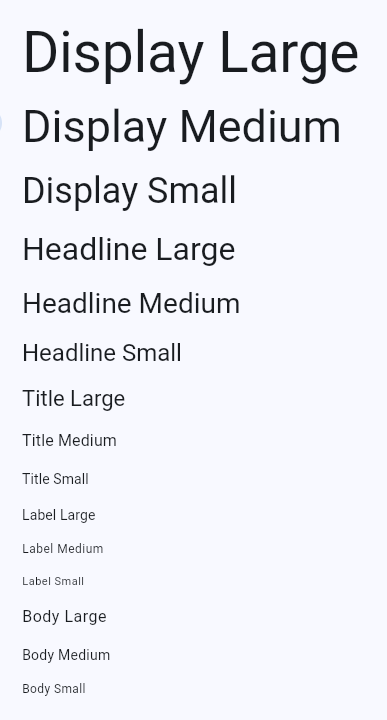
A typographical scale is a set of related text styles to provide balance,
cohesion, and visual variety in your apps.
字体排版比例尺是一组相关的文本样式,用于在应用中提供平衡、一致性和视觉多样性。
The common type scale in Flutter, provided by [`TextTheme`][], includes five
categories of text indicating the function:
Flutter 中由 [`TextTheme`][] 提供的常见字体比例尺包括五个表示功能的文本类别:
* Display
* Headline
* Title
* Label
* Body
There are also three size variations for each:
每个类别还有三种尺寸变体:
* Small
* Medium
* Large
Each of these fifteen combinations of a category and text size are represented
by a single [`TextStyle`][].
这十五种类别与文本尺寸的组合各由一个 [`TextStyle`][] 表示。
 All the platform specific typographical scales that Flutter exposes are
contained in the [`Typography`][] class. Usually, you will not need to
reference this class directly as the `TextTheme` will be localized to your target platform.
Flutter 暴露的所有平台特定字体排版比例尺都包含在 [`Typography`][] 类中。
通常你不需要直接引用该类,因为 `TextTheme` 会针对你的目标平台进行本地化。
[`TextTheme`]: https://api.flutter-io.cn/flutter/material/TextTheme-class.html
[`TextStyle`]: https://api.flutter-io.cn/flutter/painting/TextStyle-class.html
[`Typography`]: https://api.flutter-io.cn/flutter/material/Typography-class.html
## Variable fonts
## 可变字体
[Variable fonts][]
allow you to control pre-defined aspects of text styling.
Variable fonts support specific axes, such as width,
weight, slant (to name a few).
The user can select _any value along the continuous axis_
when specifying the type.
[可变字体][Variable fonts] 让你控制文本样式的预定义方面。
可变字体支持特定轴,例如宽度、字重、倾斜度(仅举几例)。
用户在指定字体时可以选择连续轴上的_任意值_。
[Variable fonts]: https://fonts.google.com/knowledge/introducing_type/introducing_variable_fonts
### Using the Google Fonts type tester
### 使用 Google Fonts 字体测试器
A growing number of fonts on Google Fonts offer some variable font capabilities.
You can see the range of options by using the Type Tester and see how you
might vary a single font.
Google Fonts 上越来越多的字体提供可变字体功能。
你可以使用 Type Tester 查看可选范围,并了解如何变化单一字体。
All the platform specific typographical scales that Flutter exposes are
contained in the [`Typography`][] class. Usually, you will not need to
reference this class directly as the `TextTheme` will be localized to your target platform.
Flutter 暴露的所有平台特定字体排版比例尺都包含在 [`Typography`][] 类中。
通常你不需要直接引用该类,因为 `TextTheme` 会针对你的目标平台进行本地化。
[`TextTheme`]: https://api.flutter-io.cn/flutter/material/TextTheme-class.html
[`TextStyle`]: https://api.flutter-io.cn/flutter/painting/TextStyle-class.html
[`Typography`]: https://api.flutter-io.cn/flutter/material/Typography-class.html
## Variable fonts
## 可变字体
[Variable fonts][]
allow you to control pre-defined aspects of text styling.
Variable fonts support specific axes, such as width,
weight, slant (to name a few).
The user can select _any value along the continuous axis_
when specifying the type.
[可变字体][Variable fonts] 让你控制文本样式的预定义方面。
可变字体支持特定轴,例如宽度、字重、倾斜度(仅举几例)。
用户在指定字体时可以选择连续轴上的_任意值_。
[Variable fonts]: https://fonts.google.com/knowledge/introducing_type/introducing_variable_fonts
### Using the Google Fonts type tester
### 使用 Google Fonts 字体测试器
A growing number of fonts on Google Fonts offer some variable font capabilities.
You can see the range of options by using the Type Tester and see how you
might vary a single font.
Google Fonts 上越来越多的字体提供可变字体功能。
你可以使用 Type Tester 查看可选范围,并了解如何变化单一字体。
 In real time, move the slider on any of the axes to
see how it affects the font. When programming a variable font,
use the [`FontVariation`][] class to modify the font's design axes.
The `FontVariation` class conforms to the
[OpenType font variables spec][].
实时移动任一轴上的滑块,查看它如何影响字体。
在编程使用可变字体时,使用 [`FontVariation`][] 类修改字体的设计轴。
`FontVariation` 类符合 [OpenType 字体变量规范][OpenType font variables spec]。
[`FontVariation`]: https://api.flutter-io.cn/flutter/dart-ui/FontVariation-class.html
[Google Fonts]: https://fonts.google.com/
[OpenType font variables spec]: https://learn.microsoft.com/en-us/typography/opentype/spec/otvaroverview
## Static fonts
## 静态字体
Google Fonts also contains static fonts. As with variable fonts,
you need to know how the font is designed to know what options
are available to you.
Once again, the Google Fonts site can help.
Google Fonts 也包含静态字体。与可变字体一样,
你需要了解字体的设计方式才能知道有哪些可用选项。
同样,Google Fonts 网站可以提供帮助。
### Using the Google Fonts package
### 使用 google_fonts package
While you can download fonts from the site and install them manually in your apps,
you can elect to use theme directly from the [google_fonts][] package on [pub.dev][].
虽然你可以从网站下载字体并手动安装到应用中,
你也可以选择直接使用 [pub.dev][] 上的 [google_fonts][] package 中的主题。
They can be used as is by referencing simply the font name:
只需引用字体名称即可直接使用:
```dart
Text(
'This is Google Fonts',
style: GoogleFonts.lato(),
),
```
or customized by setting properties on the resulting `TextStyle`:
或者通过在生成的 `TextStyle` 上设置属性进行自定义:
```dart
Text(
'This is Google Fonts',
style: GoogleFonts.lato(
textStyle: Theme.of(context).textTheme.displayLarge,
fontSize: 48,
fontWeight: FontWeight.w700,
fontStyle: FontStyle.italic,
),
),
```
### Modifying fonts
### 修改字体
Use the following API to programmatically alter a static font
(but remember that this only works if the font was _designed_
to support the feature):
使用以下 API 以编程方式修改静态字体
(但请记住,这仅在字体 **设计** 为支持该功能时才有效):
* [`FontFeature`][] to select glyphs
[`FontFeature`][] 用于选择字形
* [`FontWeight`][] to modify weight
[`FontWeight`][] 用于修改字重
* [`FontStyle`][] to italicize
[`FontStyle`][] 用于斜体
* [`FontVariation`][] to specify a range of values for a specific property.
[`FontVariation`][] 用于为特定属性指定取值范围。
A `FontFeature` corresponds to an [OpenType feature tag][]
and can be thought of as a boolean flag to enable or disable
a feature of a given font.
`FontFeature` 对应 [OpenType 特性标签][OpenType feature tag],
可视为启用或禁用给定字体某项特性的布尔标志。
[`FontFeature`]: https://api.flutter-io.cn/flutter/dart-ui/FontFeature-class.html
[`FontStyle`]: https://api.flutter-io.cn/flutter/dart-ui/FontStyle.html
[`FontWeight`]: https://api.flutter-io.cn/flutter/dart-ui/FontWeight-class.html
[OpenType feature tag]: https://learn.microsoft.com/en-us/typography/opentype/spec/featuretags
[pub.dev]: https://pub.dev
[google_fonts]: https://pub.dev/packages/google_fonts
## Other resources
## 其他资源
The following video shows you some of the capabilities
of Flutter's typography and combines it with the Material
_and_ Cupertino look and feel (depending on the platform
the app runs on), animation, and custom fragment shaders:
以下视频展示了 Flutter 字体排版的部分能力,
并结合 Material **与** Cupertino 外观(取决于应用运行的平台)、
动画以及自定义片段着色器:
To read one engineer's experience
customizing variable fonts and animating them as they
morph (and was the basis for the above video),
check out [Playful typography with Flutter][article],
a post on the Flutter blog. The associated example also
uses a custom shader.
要阅读一位工程师定制可变字体并在变形时为其添加动画的经验(也是上述视频的基础),
请查看 Flutter 博客文章 [Playful typography with Flutter][article]。
相关示例还使用了自定义着色器。
[article]: https://blog.flutter.dev/playful-typography-with-flutter-f030385058b4
In real time, move the slider on any of the axes to
see how it affects the font. When programming a variable font,
use the [`FontVariation`][] class to modify the font's design axes.
The `FontVariation` class conforms to the
[OpenType font variables spec][].
实时移动任一轴上的滑块,查看它如何影响字体。
在编程使用可变字体时,使用 [`FontVariation`][] 类修改字体的设计轴。
`FontVariation` 类符合 [OpenType 字体变量规范][OpenType font variables spec]。
[`FontVariation`]: https://api.flutter-io.cn/flutter/dart-ui/FontVariation-class.html
[Google Fonts]: https://fonts.google.com/
[OpenType font variables spec]: https://learn.microsoft.com/en-us/typography/opentype/spec/otvaroverview
## Static fonts
## 静态字体
Google Fonts also contains static fonts. As with variable fonts,
you need to know how the font is designed to know what options
are available to you.
Once again, the Google Fonts site can help.
Google Fonts 也包含静态字体。与可变字体一样,
你需要了解字体的设计方式才能知道有哪些可用选项。
同样,Google Fonts 网站可以提供帮助。
### Using the Google Fonts package
### 使用 google_fonts package
While you can download fonts from the site and install them manually in your apps,
you can elect to use theme directly from the [google_fonts][] package on [pub.dev][].
虽然你可以从网站下载字体并手动安装到应用中,
你也可以选择直接使用 [pub.dev][] 上的 [google_fonts][] package 中的主题。
They can be used as is by referencing simply the font name:
只需引用字体名称即可直接使用:
```dart
Text(
'This is Google Fonts',
style: GoogleFonts.lato(),
),
```
or customized by setting properties on the resulting `TextStyle`:
或者通过在生成的 `TextStyle` 上设置属性进行自定义:
```dart
Text(
'This is Google Fonts',
style: GoogleFonts.lato(
textStyle: Theme.of(context).textTheme.displayLarge,
fontSize: 48,
fontWeight: FontWeight.w700,
fontStyle: FontStyle.italic,
),
),
```
### Modifying fonts
### 修改字体
Use the following API to programmatically alter a static font
(but remember that this only works if the font was _designed_
to support the feature):
使用以下 API 以编程方式修改静态字体
(但请记住,这仅在字体 **设计** 为支持该功能时才有效):
* [`FontFeature`][] to select glyphs
[`FontFeature`][] 用于选择字形
* [`FontWeight`][] to modify weight
[`FontWeight`][] 用于修改字重
* [`FontStyle`][] to italicize
[`FontStyle`][] 用于斜体
* [`FontVariation`][] to specify a range of values for a specific property.
[`FontVariation`][] 用于为特定属性指定取值范围。
A `FontFeature` corresponds to an [OpenType feature tag][]
and can be thought of as a boolean flag to enable or disable
a feature of a given font.
`FontFeature` 对应 [OpenType 特性标签][OpenType feature tag],
可视为启用或禁用给定字体某项特性的布尔标志。
[`FontFeature`]: https://api.flutter-io.cn/flutter/dart-ui/FontFeature-class.html
[`FontStyle`]: https://api.flutter-io.cn/flutter/dart-ui/FontStyle.html
[`FontWeight`]: https://api.flutter-io.cn/flutter/dart-ui/FontWeight-class.html
[OpenType feature tag]: https://learn.microsoft.com/en-us/typography/opentype/spec/featuretags
[pub.dev]: https://pub.dev
[google_fonts]: https://pub.dev/packages/google_fonts
## Other resources
## 其他资源
The following video shows you some of the capabilities
of Flutter's typography and combines it with the Material
_and_ Cupertino look and feel (depending on the platform
the app runs on), animation, and custom fragment shaders:
以下视频展示了 Flutter 字体排版的部分能力,
并结合 Material **与** Cupertino 外观(取决于应用运行的平台)、
动画以及自定义片段着色器:
To read one engineer's experience
customizing variable fonts and animating them as they
morph (and was the basis for the above video),
check out [Playful typography with Flutter][article],
a post on the Flutter blog. The associated example also
uses a custom shader.
要阅读一位工程师定制可变字体并在变形时为其添加动画的经验(也是上述视频的基础),
请查看 Flutter 博客文章 [Playful typography with Flutter][article]。
相关示例还使用了自定义着色器。
[article]: https://blog.flutter.dev/playful-typography-with-flutter-f030385058b4